Key Takeaways
- Smart hands technicians perform physical IT infrastructure tasks — racking, cabling, troubleshooting — that remote tools cannot resolve
- They differ from remote hands by exercising independent judgment, not just following step-by-step instructions
- Businesses with distributed locations benefit most, converting unpredictable travel costs into on-demand service fees
- Critical industries include healthcare, financial services, retail, and manufacturing, where compliance and uptime demands are highest
- Evaluate providers on certifications, geographic coverage, and SLA clarity — not just price
What Are Smart Hands IT Services?
Smart hands IT services place skilled, certified technicians at a physical location to perform hands-on infrastructure work under the direction of remote engineers, IT managers, MSP teams, or carrier NOC staff. The technician acts as the physical extension of a team that can't be there in person.
Servers don't rack themselves, fiber doesn't splice remotely, and a failed NIC can't be swapped from a dashboard. When physical infrastructure needs physical intervention, remote monitoring and phone-based troubleshooting hit a wall.
Who typically uses smart hands services:
- Businesses with equipment in colocation data centers
- Multi-location enterprises managing distributed infrastructure across cities or regions
- Organizations opening new offices and deploying technology to fresh sites
- Companies without full-time technical staff at every location
Smart hands is distinct from general managed services or helpdesk support. It's task- and project-oriented, focused on the physical layer rather than software management or ticket queues. That makes it deployable on-demand for break-fix situations or under longer-term contracts for recurring field work.
DataTel 360 delivers smart hands and remote hands field services through its TechDispatch360 division, supporting MSPs, carriers, IT departments, and multi-site enterprises across the country. Technicians bring fiber optic expertise (including fusion splicing and OTDR-certified testing), structured cabling capabilities, and MDF/IDF buildout experience. Every engagement includes Fluke-certified results and full as-built documentation.
Smart Hands vs. Remote Hands: Key Differences
These terms get used interchangeably in the industry, which creates real confusion when scoping a project.
Remote hands covers basic, non-technical tasks performed by on-site personnel following explicit real-time instructions. Think: power cycling a device, checking indicator lights, reading console output, or plugging in a cable exactly as directed. No independent diagnosis, no configuration authority.
Smart hands technicians bring deeper technical expertise. They can troubleshoot root causes, replace components, execute configuration changes, perform structured cabling installations, and make informed decisions without step-by-step direction from a remote engineer.
The labels themselves aren't standardized across the industry. Equinix calls complex physical work "Smart Hands", while Digital Realty and CoreSite use "Remote Hands" for substantially similar technical work. The label matters less than the task catalog — always compare what's actually included.
| Capability | Remote Hands | Smart Hands |
|---|---|---|
| Power cycling, visual checks | ✅ | ✅ |
| Cable plugging per instructions | ✅ | ✅ |
| Independent troubleshooting | ❌ | ✅ |
| Component replacement | ❌ | ✅ |
| Structured cabling installation | ❌ | ✅ |
| Configuration changes | ❌ | ✅ |
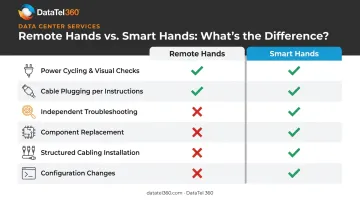
The deciding factor comes down to scope of independent judgment. Remote hands follows instructions; smart hands interprets the situation and acts on it. If your infrastructure challenge requires diagnosis rather than just physical task completion, smart hands is the appropriate service tier.
What Tasks Do Smart Hands Technicians Handle?
Hardware Installation, Racking, and Stacking
Technicians physically mount servers, switches, storage arrays, and related equipment in racks. This includes verifying proper seating and connections, confirming devices are operational post-installation, and documenting what was installed and where. It's the foundational task in any data center or server room deployment.
Structured Cabling and Fiber Optic Work
Scope varies significantly between providers. At minimum, smart hands cabling work covers running, terminating, labeling, and organizing copper and fiber cables per industry standards.
DataTel 360's capabilities go beyond the baseline. Technicians handle:
- Fusion splicing and OTDR-certified fiber testing
- Emergency fiber restoration alongside Cat6/Cat6A copper installation
- Fluke-certified copper runs and OTDR-documented fiber projects
- As-built drawings and labeled panels as standard deliverables
- Full TIA-568 compliance for commercial cabling infrastructure
Network Equipment Configuration and Troubleshooting
Technicians handle on-site configuration of routers, switches, wireless access points, and firewalls per engineer specifications. When remote diagnosis hits a wall, field teams step in to run connectivity testing and resolve issues hands-on. Component replacement — NICs, drives, memory, power supply units — follows once field diagnosis confirms hardware failure.
Moves, Adds, Changes, and Decommissions (MACD)
Physically relocating equipment between racks or sites, adding new devices to existing infrastructure, modifying configurations as directed, and safely decommissioning end-of-life hardware. Decommissioning work should include data sanitization and proper disposal protocols — confirm these are explicitly in scope when engaging a provider.
Asset Audits and Documentation
Physical audits of data center or server room assets, tagging and scanning equipment, reconciling inventory records, and maintaining accurate documentation. Critical for compliance, capacity planning, and lifecycle management — and particularly valuable when inherited infrastructure has poor or outdated records.
Key Benefits of Smart Hands IT Support
Faster Resolution When Physical Problems Occur
When hardware fails at a remote site, the response path matters. Dispatching a pre-authorized technician eliminates the travel stage entirely. ITIC's 2024 survey of more than 1,000 organizations found that over 90% of midsize and large enterprises reported one hour of downtime cost more than $300,000 — with 41% placing it between $1M and $5M. That's the exposure smart hands services are designed to reduce.
Physical failures drive a significant share of that exposure. Uptime Institute's 2024 outage analysis found that power caused 52% of recent impactful incidents, with network issues accounting for 19% — both categories that typically demand physical intervention.
Cost Efficiency Without Sacrificing Expertise
Maintaining full-time, on-site IT technicians at every location is expensive and, for most organizations, unnecessary. The Bureau of Labor Statistics reports 2024 median pay of $73,340 for computer network support specialists and $96,800 for network and systems administrators — before benefits, which add roughly 30% to total compensation.
Smart hands services convert those fixed costs into on-demand fees that scale with actual usage. You get certified, experienced technicians when you need them, without carrying the overhead when you don't.
Scalability for Multi-Location Operations
As a business adds offices or expands its infrastructure footprint, smart hands coverage scales proportionally. No need to hire local IT staff in every market. DataTel 360's TechDispatch360 division specifically addresses this — providing nationwide field service dispatch from a single point of contact for multi-site organizations.
Internal IT Team Liberation
Smart hands services handle the physical layer so in-house engineers can focus on higher-value work:
- Cloud migrations and infrastructure transitions
- Security architecture and compliance projects
- Application development and system integrations
- Strategic planning — not travel and rack-and-stack dispatches
Security and Compliance Assurance
Vetted technicians follow strict access control and data handling protocols. This matters particularly in regulated industries:
- HIPAA (45 CFR 164.310) requires facility access controls, workstation safeguards, and device/media controls for healthcare environments
- PCI DSS v4.0.1 (Requirement 9) mandates visitor authorization, visible identification, escorted access in cardholder data environments, and visitor logs retained for at least three months
Neither regulation mandates a specific service label — but both require controlled, documented physical access. Any provider you engage should demonstrate documented chain-of-custody procedures and be able to produce access logs on request — not just claim compliance.
Which Industries Benefit Most from Smart Hands Services?
The highest-ROI industries share a common trait: distributed physical infrastructure that can't go down.
| Industry | Primary Smart Hands Need |
|---|---|
| Healthcare | Connected medical devices, compliance-driven access controls, uptime across clinical locations |
| Financial services | Mission-critical uptime, physical security requirements, continuity planning |
| Retail & hospitality | POS systems and digital infrastructure across many storefronts or properties |
| Manufacturing & logistics | Industrial IoT, operational technology, and warehouse network infrastructure |
| Property management | Distributed commercial real estate with telecommunications infrastructure across multiple buildings |
| Multi-location enterprises | Consistent IT standards and fast response times across offices in different cities or regions |
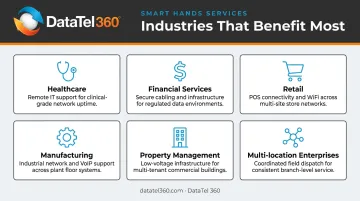
The more locations a business manages, the harder it becomes to maintain consistent IT standards with internal staff alone. Smart hands services aren't just a convenience at that scale — they're an operational requirement.
Smart hands work has expanded well beyond traditional colocation data centers. Corporate offices, retail storefronts, branch locations, and industrial facilities all qualify — which means any multi-site organization managing physical IT assets is in scope, whether that's a regional healthcare network or a national retail chain.
How to Choose the Right Smart Hands IT Provider
Verify Technical Credentials and Field Experience
Look for providers with certified engineers who have documented, hands-on experience with your specific infrastructure types. Relevant credentials include:
- BICSI INST1, INSTC, INSTF, TECH — cabling installation at progressive skill levels
- CompTIA Network+ or Server+ — vendor-neutral network and server expertise
- Cisco CCNA or Juniper JNCIA — platform-specific networking knowledge
Credential fit should follow the task. A cabling certification doesn't prove server expertise; a networking cert doesn't cover fiber splicing. Ask providers to map specific technician credentials to the specific work you need done.
Confirm Response Times and Geographic Coverage
A provider's value comes down to how quickly they can get a technician to your locations — and whether they cover all of them. Key questions to ask:
- Do you offer same-day and next-day on-site availability?
- Is 24/7/365 emergency dispatch available, including weekends and holidays?
- Do you cover all of my locations — primary offices and remote branches?
DataTel 360 operates with 24/7/365 emergency dispatch and same-day on-site availability within metro service areas, with nationwide reach through TechDispatch360. If your infrastructure spans multiple markets, you need a provider with that same combination: reliable local depth and proven national reach.
Assess SLA Structure and Accountability
The right partner defines response windows, task completion standards, escalation procedures, and performance reporting in writing. Equinix, for reference, publishes standard turnaround SLOs of 36 clock hours at 24/7 sites. That's a turnaround target, not a guaranteed incident resolution time. Know the difference.
Your contract should separately define each stage of the response chain:
- Acknowledgement time — when the ticket is confirmed received
- Dispatch time — when a technician is assigned and en route
- Arrival time — when the technician reaches the site
- Work start time — when active remediation begins
- Restoration target — when the issue is resolved or escalated
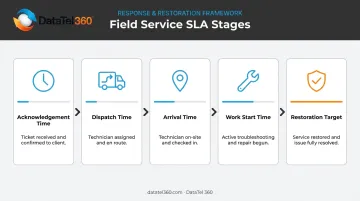
Clarity on what triggers escalation — and what constitutes a missed commitment — is just as important as the time windows themselves.
Frequently Asked Questions
What is a smart hands technician?
A smart hands technician is a skilled, on-site IT professional dispatched to perform hands-on infrastructure tasks — hardware installation, cabling, troubleshooting, component swaps — that can't be handled remotely. They work under the direction of remote engineers but carry enough expertise to diagnose and act independently, without step-by-step guidance.
What tasks do smart hands IT services cover?
Primary task categories include hardware racking and installation, structured cabling (copper and fiber), network equipment configuration, component replacement, MACD (moves, adds, changes, and decommissions), physical asset audits, and on-site troubleshooting of network and server infrastructure.
What is the difference between smart hands and remote hands?
Remote hands handle basic, non-technical tasks under explicit real-time instructions, such as power cycling, visual checks, and cable plugging. Smart hands technicians bring deeper expertise that enables independent troubleshooting, configuration changes, and complex installations with minimal remote guidance.
When does a business need smart hands support?
Common triggers include IT equipment at a remote site or colocation facility with no local staff, hardware failures requiring physical intervention, new infrastructure deployments across additional locations, and internal IT teams stretched too thin to cover physical tasks at multiple sites.
How do I choose the right smart hands IT provider?
Prioritize verified technical certifications matched to your infrastructure type, confirmed geographic coverage with 24/7 availability, and SLAs that specify acknowledgement, dispatch, arrival, and restoration timeframes — not just vague response windows.
Are smart hands IT services available 24/7?
Reputable providers offer round-the-clock availability, including emergency dispatch for critical infrastructure failures. Confirm 24/7/365 coverage as a non-negotiable requirement. DataTel 360 provides 24/7/365 emergency dispatch with same-day on-site response within metro service areas.