Introduction
Managing WiFi across five locations is complicated. Managing it across fifty — without consistent configurations, centralized visibility, or uniform security — is a liability.
Consumer-grade and fragmented wireless setups simply cannot support the demands of modern multi-site operations. Cloud applications, IoT devices, video conferencing, and hybrid workforces have fundamentally changed what "good enough" WiFi means.
When one branch runs outdated firmware, another has no guest VLAN isolation, and a third is experiencing persistent RF interference, the cumulative impact on productivity and security adds up fast.
According to IDC, the enterprise WLAN market reached $9.4 billion in 2024, with Q1 2026 revenue growing 15.9% year-over-year to nearly $2.7 billion. Organizations across every sector are actively replacing fragmented setups with purpose-built enterprise infrastructure.
This guide covers the top enterprise WiFi platforms built specifically for multi-location deployments, what separates them, and how to evaluate the right fit for your organization.
Key Takeaways
- WiFi 7 (802.11be) now accounts for 44.5% of enterprise access point revenue: it has become the deployment standard for new enterprise infrastructure in 2026
- Centralized cloud management is the most critical differentiator for multi-location wireless — not raw speed or hardware specs
- The five leading platforms (Cisco Meraki, HPE Aruba, Juniper Mist, Ubiquiti UniFi, and TP-Link Omada) target different organizational sizes, budget ranges, and IT staffing models
- Total cost of ownership over 3-5 years matters more than upfront hardware price; licensing fees vary dramatically across vendors
- A pre-deployment site survey prevents the most expensive multi-location WiFi mistakes
What Is Enterprise WiFi and Why Does It Matter for Multi-Location Businesses?
Enterprise WiFi is wireless infrastructure purpose-built for high-demand commercial operations — not a scaled-up version of home networking. The differences run deeper than price.
Where consumer or small business WiFi handles a handful of devices on a single subnet, enterprise-grade systems are architected around:
- High-density capacity — supporting hundreds of concurrent devices per access point
- WPA3-Enterprise security — requiring 802.1X/EAP authentication with Protected Management Frames mandated
- Dynamic VLAN segmentation — isolating guest, staff, IoT, and operational traffic at the network level
- Centralized cloud management — monitoring, configuring, and troubleshooting every location from a single dashboard
- WIDS/WIPS — wireless intrusion detection and prevention systems that continuously monitor the RF environment
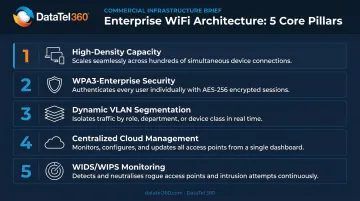
For multi-location businesses, the stakes are higher. Inconsistencies in WiFi configuration, security policies, or firmware versions across branches create both operational friction and cybersecurity exposure. A breach enabled by a misconfigured guest network at one location isn't isolated: it affects the entire organization.
The 2026 WiFi Infrastructure Landscape
WiFi 7 dependent-AP revenue hit $958.4 million in Q1 2026, representing 44.5% of the enterprise segment — up from under 1% of revenue just two years prior. Dell'Oro forecasts WiFi 7 will exceed 90% of indoor AP revenue by 2028.
For organizations investing in new multi-location infrastructure now, deploying WiFi 7 handles bandwidth demands and device density growth over the next 5–7 years without requiring a full infrastructure replacement.
Best Enterprise WiFi Solutions for Multi-Location Businesses in 2026
These platforms were evaluated on centralized multi-site management capability, security feature depth, scalability, reliability, and total cost of ownership — not hardware specifications alone.
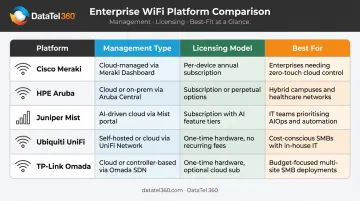
Five platforms are covered below, ranging from AI-native enterprise systems to cost-efficient options for organizations managing dozens of locations on tighter budgets. Use the Best for and Trade-off callouts to narrow the field before requesting vendor demos.
Cisco Meraki
For multi-location IT teams that need full-stack visibility from a single dashboard, Cisco Meraki is the default starting point. Access points, switches, firewalls, and cameras all fall under one cloud-managed interface, and new sites can come online without pre-staging hardware.
Key differentiators:
- Zero-touch provisioning for new locations (APs self-configure when connected)
- Real-time RF optimization and per-site or global policy enforcement
- Deep security integrations including Cisco Umbrella for DNS-layer threat protection
- Named a Leader in both the 2025 IDC MarketScape for Enterprise WLAN and the 2026 Gartner Magic Quadrant
| Feature | Details |
|---|---|
| Management Platform | Meraki Dashboard — cloud-based, single pane of glass across all locations |
| WiFi Standards | WiFi 6E (MR57) and WiFi 7 (CW9172I, CW9176D1, CW9178I) |
| Licensing Model | MR Enterprise (standard cloud management + ZTP) or MR Advanced (adds AIOps, AI-RRM, Adaptive Policy); per-device annual or multi-year subscription required |
Best for: Large enterprises, regulated industries (healthcare, financial services), and organizations that need full-stack Cisco ecosystem integration.
Trade-off: Recurring per-device licensing costs add up across hundreds of locations — evaluate 3-5 year TCO carefully before committing.
HPE Aruba Networking
HPE Aruba brings AI-powered network operations to multi-location wireless. Its ArubaOS platform has deep deployment history across healthcare, education, manufacturing, and retail environments globally.
Key differentiators:
- Aruba Central's AIOps engine flags degraded AP performance, rogue devices, and connectivity anomalies before tickets get opened — with automated root cause analysis that reduces troubleshooting time
- Native Zero Trust and SASE framework support (ZTNA, secure web gateway, CASB, DLP)
- Named a Leader in the 2025 IDC MarketScape for Worldwide Enterprise WLAN
| Feature | Details |
|---|---|
| Management Platform | Aruba Central — cloud-native AIOps with multi-site management and AI-driven troubleshooting |
| WiFi Standards | WiFi 6E (650 Series) and WiFi 7 (740 and 750 Series campus APs) |
| Licensing Model | Hardware purchase + Aruba Central subscription (Foundation and Advanced tiers); contact HPE for current pricing |
Best for: Compliance-heavy industries, organizations building toward Zero Trust architecture, and IT teams that want AI-assisted operations rather than manual troubleshooting.
Trade-off: Platform breadth can increase complexity for smaller IT teams without dedicated network staff.
Juniper Mist (Now Part of HPE)
HPE completed its acquisition of Juniper Networks on July 2, 2025. The Mist brand and AI-native platform remain intact under HPE Juniper Networking.
Mist's defining characteristic is its AI engine, which processes network telemetry continuously to self-optimize RF environments, detect anomalies, predict failures, and reduce mean time to repair across distributed sites.
Key differentiators:
- Marvis AI virtual assistant handles natural-language network troubleshooting — IT teams can diagnose multi-site issues without deep RF expertise
- Microservices cloud architecture means adding 50 new locations doesn't degrade dashboard performance or management responsiveness
- Gartner placed Juniper highest for Ability to Execute and furthest for Completeness of Vision in the 2025 Magic Quadrant for Enterprise Wired and Wireless LAN Infrastructure — for the fourth consecutive year
| Feature | Details |
|---|---|
| Management Platform | Mist Cloud with Marvis AI virtual network assistant; fully cloud-native |
| WiFi Standards | WiFi 6E (AP34, AP45) and WiFi 7 (AP37 performance-tier, AP47 high-density four-radio) |
| Licensing Model | Subscription-based per-AP licensing tiers; contact HPE Juniper for current structure |
Best for: Organizations that want the most advanced AI-native wireless operations and have complex, high-density multi-site environments.
Trade-off: Post-acquisition integration is ongoing. Specifically, confirm how Mist licensing tiers map to HPE's broader subscription structure, and clarify which support tier covers your deployment size before signing.
Ubiquiti UniFi
When licensing overhead is a real constraint, Ubiquiti UniFi changes the math. The UniFi Network Application, available self-hosted or cloud-hosted, provides centralized management for APs, switches, and gateways across all sites — with no mandatory per-device subscription.
Key differentiators:
- No per-device licensing fees for standard management — a 50-location deployment avoids the five-figure annual recurring costs typical of Meraki or Aruba
- Enterprise WiFi 7 AP lineup includes the E7, E7 Campus, and E7 Audience models
- Significantly lower total cost of ownership compared to Meraki or Aruba across a 50+ location deployment
| Feature | Details |
|---|---|
| Management Platform | UniFi Network Application — self-hosted on-premises or via Ubiquiti cloud; no mandatory subscription for standard management |
| WiFi Standards | WiFi 6, WiFi 6E, and WiFi 7 (E7 enterprise family) |
| Pricing Model | Hardware purchase; optional advanced cloud services may carry additional cost |
Best for: Organizations with capable in-house IT teams and cost-conscious operators managing dozens of locations where licensing overhead would be prohibitive.
Trade-off: UniFi requires more hands-on configuration and ongoing management than fully managed enterprise platforms. It is not the right fit for organizations without dedicated internal networking staff.
TP-Link Omada
Retail chains, restaurant groups, and hospitality operators regularly land on TP-Link Omada when they need consistent multi-location WiFi management without per-device licensing. The ecosystem covers access points, switches, routers, and a software controller available as a hardware appliance, software install, or cloud-hosted service.
Key differentiators:
- Omada Cloud Essentials offers free/lifetime-free cloud management for supported devices — no per-device subscription required for standard features
- Supports VLAN segmentation, guest network controls, and VPN capabilities across all sites
- WiFi 7 APs available (EAP773, EAP783) alongside WiFi 6E options
| Feature | Details |
|---|---|
| Management Platform | Omada Cloud Controller — free cloud access included; hardware controller optional for on-premises |
| WiFi Standards | WiFi 6E (EAP690E HD) and WiFi 7 (EAP773, EAP783) |
| Pricing Model | Hardware purchase; Omada Cloud Essentials included at no additional subscription fee for standard management |
Best for: Retail chains, restaurant groups, property management companies, and hospitality operators that need consistent multi-location WiFi without enterprise-tier licensing overhead.
Trade-off: Omada does not match Meraki, Aruba, or Mist in AIOps depth, SLA support, or enterprise security feature breadth. The free management tier is feature-limited compared to paid tiers.
Key Features to Look for in Enterprise WiFi for Multiple Locations
Centralized Cloud Management
Any platform deployed across multiple sites must offer a true single-pane-of-glass dashboard. This means IT teams can push configuration changes, monitor performance metrics, and respond to issues at any location without dispatching a technician on-site.
Without it, every firmware update, policy change, or troubleshooting event becomes a manual, location-by-location effort — the defining difference between a multi-location-ready platform and basic business WiFi.
Consistent Security Architecture
Enterprise WiFi security cannot be managed site by site. Look for:
- WPA3-Enterprise with 802.1X/EAP authentication and Protected Management Frames
- Dynamic VLAN assignment to isolate guest, staff, IoT, and operational traffic
- WIDS/WIPS for continuous RF monitoring and threat containment
- Centralized policy enforcement so security rules apply globally from one dashboard, not configured manually per site
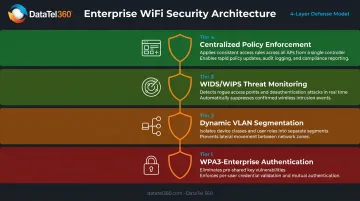
Inconsistent security configuration across sites is one of the most common vectors for lateral network breaches — a risk that disappears when policy enforcement is centralized.
Scalability and Zero-Touch Provisioning
Opening a new location should not require a network engineer on a plane. Zero-touch provisioning (ZTP) allows new access points to automatically pull their configuration from the cloud when physically connected, which cuts deployment time and eliminates manual setup errors.
ZTP handles the launch, but long-term scalability depends on the broader platform. Evaluate whether it supports:
- Seamless roaming for mobile workers moving through large facilities
- Capacity planning tools that model coverage requirements before installation
- Platform scalability from 3 locations to 300 without requiring a platform migration
How We Chose the Best Enterprise WiFi Solutions
These platforms were assessed on five dimensions:
- Multi-site management capability — Can IT genuinely manage 10 or 100 locations from one interface?
- Security feature depth — Not just encryption, but segmentation, access control, and threat detection
- Scalability — Does the platform support growth without requiring a migration?
- Total cost of ownership — Hardware, licensing, support, and operational overhead over 3-5 years
- Deployment track record — Real-world performance across industries relevant to multi-location enterprises
Common Selection Mistakes to Avoid
Organizations make costly errors when choosing enterprise WiFi without professional guidance:
- AP hardware specs matter far less than the management platform — what counts is whether IT can actually run 50 locations from one dashboard
- Licensing costs over 3-5 years are routinely underestimated — per-device subscriptions on a cheaper hardware platform can surpass a higher-upfront alternative within two years
- Skipping site surveys — placing APs from floor plan estimates instead of RF propagation data causes dead zones, interference, and costly re-cabling
- Brand recognition isn't a fit indicator — a platform built for a 500-person enterprise can be the wrong operational choice for a 40-location retail chain with a two-person IT team
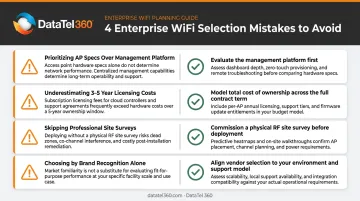
A vendor-neutral assessment prevents these misalignments before a single AP is mounted. DataTel 360 has deployed enterprise wireless infrastructure for multi-location businesses across Atlanta and the Southeast since 1998. With nationwide reach through TechDispatch360, the team provides site surveys, vendor-neutral platform evaluation, certified installation, and 24/7 support.
Conclusion
No single enterprise WiFi platform wins for every organization. The right choice depends on your IT capabilities, growth trajectory, security requirements, and total budget over the next 3–5 years.
- Cisco Meraki — enterprise-scale, compliance-driven environments needing full-stack visibility
- HPE Aruba — AI-driven operations with Zero Trust and SASE architecture
- Juniper Mist — the most advanced AI-native wireless operations for complex multi-site environments
- Ubiquiti UniFi — strong value for IT-capable teams without licensing overhead
- TP-Link Omada — cost-conscious multi-location operators in retail, hospitality, and property management
Whichever platform fits your profile, three steps apply before you commit: conduct a professional site survey, evaluate total cost of ownership beyond hardware pricing, and honestly assess whether your IT team can manage the solution at scale across every location.
DataTel 360 has been helping multi-location businesses across Atlanta, Georgia, and nationwide design, deploy, and support enterprise wireless infrastructure since 1998. As a vendor-neutral infrastructure contractor with certified technicians and 24/7 support, DataTel 360 helps organizations identify the right platform, execute professional installations, and keep every location connected.
Ready to get started? Contact DataTel 360 at 770-441-9999 or sales@datatel360.com to schedule a wireless networking consultation.
Frequently Asked Questions
Is wireless well suited for enterprise networks?
Modern enterprise WiFi (WiFi 6 and WiFi 7) is built for mission-critical environments, with 802.1X authentication, WPA3-Enterprise security, VLAN segmentation, and high-density AP designs that support hundreds of concurrent devices. What determines reliability is design quality — professional RF site surveys and proper deployment separate a solid enterprise network from one that causes constant problems.
What is the new WiFi technology in 2026?
WiFi 7 (IEEE 802.11be) is the leading wireless standard in 2026. It delivers up to 30 Gbps throughput at the MAC layer, Multi-Link Operation (MLO) for simultaneous multi-band transmission, 320 MHz channels, and reduced latency in high-device-density environments. Cisco Meraki, HPE Aruba, Juniper Mist, Ubiquiti, and TP-Link Omada all have WiFi 7 APs available now.
What is the difference between enterprise WiFi and standard business WiFi?
Enterprise WiFi is designed to manage dozens to thousands of access points across multiple locations from a centralized platform, enforce consistent security policies (802.1X, dynamic VLANs, Zero Trust), and support seamless roaming across large campuses — often backed by formal SLAs and professional support. Standard business WiFi typically covers a single location with simpler management, fewer security controls, and no multi-site coordination capability.
How many access points does a multi-location business typically need per site?
AP count depends on physical space, building materials, device density, and application requirements. Cisco documents a general baseline of 1,000–1,500 sq ft per AP for standard offices, but warehouses, healthcare facilities, and retail floors require a professional RF site survey — there is no reliable universal ratio for complex environments.
What should I look for in a managed WiFi provider for multiple locations?
Prioritize providers that offer centralized management across all sites from a single platform, professional site surveys before deployment, zero-touch provisioning for new locations, documented SLAs for uptime and response time, vendor-neutral hardware assessment, and ongoing monitoring rather than break-fix support only.
How does centralized cloud management benefit multi-location businesses?
Centralized cloud management allows IT teams to configure, monitor, and troubleshoot access points at every location from one dashboard — without traveling on-site. This enables faster issue resolution, consistent security policy enforcement across all branches, automated firmware updates, and real-time visibility into network health, device counts, and bandwidth usage at every location simultaneously.