Who can realistically handle it? A combination of licensed electricians, certified network engineers, HVAC specialists, and experienced IT infrastructure contractors. When any of those disciplines is missing or under-qualified, the consequences are predictable: thermal failures, compliance violations, costly rework, and system downtime that traces directly back to the installation, not the equipment.
This guide covers the complete process — from site readiness and infrastructure prerequisites through step-by-step deployment phases, validation, and the most common problems to watch for before you go live.
Key Takeaways
- Data center installation spans four disciplines: electrical, cooling, networking, and IT — each requires specialists
- Site readiness must be confirmed before equipment is ordered, not after it arrives
- Installation follows a fixed sequence: site prep → power and cooling → rack and cabling → IT equipment → configuration
- Every system must be validated under real conditions before the facility goes live
- Poor documentation at commissioning compounds operational costs for years
Data Center Installation Guide
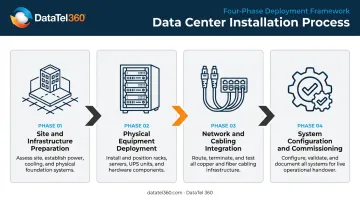
Data center installation broadly covers four phases:
- Site and infrastructure preparation — civil work, power, grounding, and environmental baselines
- Physical equipment deployment — racks, UPS systems, PDUs, and cooling units
- Network and cabling integration — structured cabling, fiber, and connectivity verification
- System configuration and commissioning — switch configuration, integration, and validation
Set realistic timeline expectations upfront. A small server room installation may take days to a few weeks. A mid-size enterprise data center typically runs several months. Large-scale builds with parallel workstreams across trade teams can span a year or more — complexity scales with redundancy requirements, power density, and integration depth.
Prerequisites and Site Readiness
Site readiness must be confirmed before equipment is ordered. Discovering a power capacity shortfall or HVAC deficit after racks arrive on the floor is an expensive problem.
Critical pre-checks:
- Power capacity: Confirm available amperage, circuit count, and voltage against planned IT load. UPS systems should carry at least 25% spare capacity above connected load.
- Floor load ratings: Verify raised floor or concrete slab weight limits against planned rack weights, particularly for high-density configurations.
- Cooling capacity: Confirm CRAC/CRAH, in-row, or liquid cooling design aligns with projected rack heat densities. ASHRAE's 2021 thermal guidelines recommend inlet temperatures of 18–27°C for air-cooled equipment classes.
- Cable pathways: Confirm fiber demarcation points, conduit runs, and cable tray clearances are in place before rack positioning begins.
Compliance and safety requirements that must be met before installation proceeds:
- Electrical work completed to NEC standards (current 2026 edition), including grounding and bonding per NEC Article 250
- Fire suppression systems installed and certified under NFPA 75 (2024) and NFPA 76 (2024)
- Access control and physical security infrastructure in place before IT equipment arrives
Non-negotiables: Do not proceed if power circuits are uncertified, if environmental sensors show temperature or humidity outside vendor-specified ranges, or if cable pathways are incomplete. These conditions guarantee post-installation failures.
Structured cabling infrastructure — fiber and copper pathways, patch panels, and cable trays — should be fully installed and tested before IT equipment arrives. Retrofitting cabling around installed racks is one of the most reliable sources of project delays.
Once site readiness is confirmed, procurement sequencing becomes the next critical constraint.
Infrastructure Components Required
Procure all components with confirmed lead times before installation begins. UPS systems and generators have historically carried long delivery windows — as of 2023, lead times for generators and UPS containers ran 45–50+ weeks — so early procurement is essential.
Essential components by category:
| Category | Components |
|---|---|
| Racks and enclosures | Server racks/cabinets, rails, blanking panels, cable managers |
| Power infrastructure | PDUs rated for anticipated load, UPS systems, backup generators |
| Cooling | CRAC/CRAH units, in-row cooling, or liquid cooling systems |
| Cabling | Fiber optic (single-mode and multimode), copper (Cat6/Cat6A), cable trays |
| Connectivity | Patch panels, cable management hardware, fiber distribution panels |
| Monitoring | Environmental sensors (temperature, humidity, differential pressure) |
| Security | Access control, surveillance systems |
Essential vs. deferrable:
- Deploy before go-live: Redundant A/B power feeds. Uptime Institute Tier III requires redundant distribution paths; Tier IV requires independent, physically isolated systems.
- Phase in post-commissioning: DCIM (Data Center Infrastructure Management) software — valuable for visibility and capacity planning, but not a hard dependency for initial cutover.
- Defer for smaller builds: Hot/cold aisle containment. Best practice for any density above 5–6 kW per rack, but scalable to implement after initial commissioning.
The cabling backbone — fiber termination, fusion splicing, Fluke-certified copper testing, and OTDR-verified fiber documentation — needs to be fully certified before a single server goes into a rack. DataTel 360 handles this phase for commercial deployments across Atlanta and the Southeast, providing the verified, documented cabling foundation that physical IT deployment depends on.
How to Install a Data Center: Step-by-Step
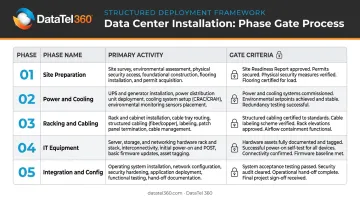
A data center installation moves through five distinct phases — site preparation, power and cooling, racking and cabling, IT equipment, and system integration. Each phase must be completed and verified before the next begins. Phase overlap is the primary driver of integration failures and rework.
| Phase | Primary Activity | Gate Criteria Before Advancing |
|---|---|---|
| 1 | Site Preparation | Civil work complete, environment verified |
| 2 | Power & Cooling | Load tested, BMS online |
| 3 | Racking & Cabling | All runs terminated and tested |
| 4 | IT Equipment | Firmware checked, IPMI/BMC accessible |
| 5 | Integration & Config | As-built documentation complete |
Step 1: Prepare the Installation Site
- Confirm all civil and structural work is complete: raised floor tiles set, conduit runs finished, grounding grids installed
- Verify environmental baselines — temperature, humidity, airflow — are within range before equipment arrives
- Pre-install cable trays, vertical and horizontal cable managers, and rack mounting hardware
Step 2: Install Power and Cooling Infrastructure
- Set UPS systems, PDUs, and backup generators first; complete all electrical connections and label circuits before energizing
- Perform load testing on circuits before any IT equipment is connected
- Install cooling units and validate airflow patterns using hot/cold aisle principles — hot/cold aisle layouts can yield 10–35% cooling savings compared to unorganized configurations
- Confirm environmental sensors are online and the Building Management System (BMS) is reporting correctly
Step 3: Rack Positioning, Cabling, and Termination
- Position and anchor server racks per the floor layout plan
- Install all structured cabling — fiber and copper — following the pre-designed pathway plan; maintain proper bend radius and separate power and data cables throughout
- Terminate and test all cabling runs before mounting any IT equipment
- Label every cable and port per documentation standards — skip this step and you will spend hours troubleshooting unlabeled connections during commissioning
Step 4: Install IT Equipment
- Mount servers, storage systems, switches, and routers per the equipment layout plan
- Connect power (confirming A/B path redundancy at the PDU level), network cables, and management cables per port maps
- Perform initial BIOS and firmware checks; confirm IPMI/BMC access (out-of-band management) on each device before first power-on
Step 5: System Integration and Initial Configuration
- Configure network switches, VLANs, and routing; establish management network access
- Integrate server and storage systems with monitoring platforms
- Confirm all uplinks are live and all systems report expected sensor readings
- Document the as-built configuration for every device before handoff for production
Post-Installation Checks and Validation
Validation is not the last item on a checklist — it is the formal confirmation that every installed system is operating correctly under real conditions. Uptime Institute's 2024 outage analysis found that 80% of serious outages could have been prevented with better processes or configuration, and 52% of impactful outages trace back to power systems — exactly the systems most likely to have undetected installation issues before go-live.
Visual and structural checks first:
- All racks are properly grounded and secured
- Blanking panels are installed in every empty rack U — gaps here create airflow bypass that produces hot spots
- All cables are routed and labeled per the as-built plan
- No physical damage occurred during equipment installation
Functional testing sequence:
- Measure actual power draw at each PDU against expected load profiles; flag any circuit imbalances
- Run UPS failover tests to confirm backup power activates and transfer times are within spec
- Verify cooling units maintain target inlet temperatures under load
- Test all network ports against the port map; confirm all uplinks are active and error-free
- Check that all environmental sensors are reporting to the monitoring platform
What to look for — indicators of incorrect installation:
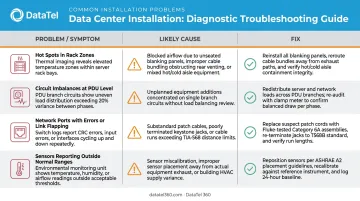
- Unexpected hot spots in specific rack zones: typically caused by missing blanking panels or incorrectly oriented equipment creating airflow bypass
- Circuit imbalances at the PDU level: points to improper load distribution or unbalanced A/B feeds
- Network ports showing errors or link flapping: usually a cabling fault or misconfigured switch
- Sensors reporting outside normal ranges: indicates a cooling or environmental control problem that needs immediate investigation
Document all validation results — including any deviations from design — in the commissioning record before sign-off. Pay particular attention to thermal data: the Rack Cooling Index (RCI) measures how well cold air reaches IT equipment inlets, and a reading below 90% is a recognized threshold for elevated overheating risk that should be resolved before the facility goes live.
Common Data Center Installation Problems and Fixes
Even well-planned installations run into problems. Catching them before the facility goes live determines whether you're dealing with a quick fix or an expensive outage. The three most common culprits are cooling failures, power imbalances, and cabling errors — each with clear causes and straightforward remedies.
Hot Spots Appearing Despite Normal Cooling Operation
Certain rack zones run hotter than others even when the cooling system appears to be operating normally.
Likely cause: Missing blanking panels creating airflow bypass, incorrect hot/cold aisle orientation, or equipment installed with airflow direction misaligned to aisle containment design.
Fix: Install all missing blanking panels immediately. Verify equipment airflow direction — front-to-back vs. rear exhaust — aligns with aisle containment. Reposition equipment if needed and re-validate rack inlet temperatures before sign-off.
PDU Overloads and Unbalanced Power Distribution
PDUs show unequal load distribution, or circuits trip under what should be normal operating conditions.
Likely cause: IT equipment connected without following the load distribution plan, A/B power paths not properly balanced, or PDU capacity undersized relative to actual draw.
Fix: Redistribute loads across PDUs per the original capacity plan. Confirm all dual-corded equipment is using both A and B feeds. If capacity is genuinely undersized, escalate to a circuit upgrade before the facility goes live — not after.
Network Ports Failing End-to-End Connectivity Tests
Network ports show no link or intermittent connectivity, and end-to-end tests come back failed.
Likely cause: Incorrect terminations, excessive bend radius on fiber causing signal loss, port map mismatches, or mislabeled cables.
Fix: Re-run end-to-end cable tests using a cable certifier. Cross-reference physical connections against the documented port map. Re-terminate any fiber connections that fail optical loss testing. Update documentation to reflect every correction made — an as-built that doesn't reflect reality is worse than no documentation at all.
Pro Tips for Installing a Data Center Effectively
Stage equipment before it enters the rack. Rushing gear from the loading dock straight into production is one of the most common — and costly — shortcuts in data center work. Before installation begins:
- Inspect all hardware for shipping damage
- Verify serial numbers against purchase orders
- Complete firmware and BIOS updates during staging
Resolving these issues at the staging phase prevents damage to live systems and avoids the much harder task of pulling and replacing equipment mid-project.
Documentation is a deliverable, not an afterthought. As-built drawings, cable schedules, rack elevations, port maps, and environmental baseline readings captured at commissioning become the foundation for every future maintenance activity, expansion, and troubleshooting effort. Facilities that skip this step consistently spend more on support over time.
DataTel 360 delivers Fluke-certified copper test reports, OTDR-verified fiber documentation, port schedules, rack elevations, and PDF as-built packages as standard project closeout items — not optional extras.
Even thorough documentation can't fix work done incorrectly — which is why knowing when to bring in a specialist is just as important as any technical step. Electrical work, fiber termination, structured cabling certification, and UPS commissioning all require licensed or certified professionals. Using generalist contractors for these disciplines routinely results in compliance failures, rework, and voided warranties.
The 54% of organizations whose most recent significant outage cost more than $100,000 rarely planned for that expense — it arrived because something wasn't done right the first time.
Conclusion
Data center installation quality determines facility reliability, operational efficiency, and total cost of ownership for years after commissioning. Errors made during installation compound — they don't self-correct. A thermal issue ignored during validation becomes an unplanned outage six months later. Skipping cabling verification during testing means a connectivity fault that could have been caught in minutes turns into hours of diagnosis under live conditions.
Engage experienced specialists for every phase — from structured cabling and fiber runs to rack-and-stack and final commissioning. Thorough documentation and validation aren't optional wrap-up tasks; they're what separates a facility that performs reliably from one that doesn't. DataTel 360's data center support teams handle exactly these phases for commercial clients across Atlanta and the Southeast, with Fluke-tested, fully documented turnover packages on every project. Getting it right during installation is always less costly than fixing it after go-live.
Frequently Asked Questions
How much does it cost to install a data center?
Costs vary significantly based on scale, tier level, power density, and whether the facility is a new build or retrofit. There is no universal benchmark — a small server room and an enterprise Tier III facility fall into completely different cost ranges. Accurate scoping requires a specialist assessment of your specific site and requirements.
Who installs data centers?
Data center installation requires a coordinated team of specialists: licensed electricians, HVAC/mechanical engineers, certified structured cabling contractors, and IT infrastructure engineers. No single generalist contractor covers all of these disciplines — gaps in any one area will create failures across the others.
How long does data center installation typically take?
Timelines range from a few weeks for a small server room to several months or more than a year for a full enterprise data center. The primary variables are complexity, redundancy requirements, equipment lead times, and the number of parallel workstreams running simultaneously.
What is the difference between data center installation and data center construction?
Construction refers to building the physical facility — civil, structural, shell, and core. Installation refers to deploying the technology infrastructure inside the completed or existing structure: power systems, cooling, racks, cabling, and IT equipment. The two phases are sequential: installation begins only after the facility structure is complete or sufficiently ready.
What compliance standards apply to data center installation in the US?
Key standards include the NEC (2026 edition) for electrical work, ASHRAE thermal guidelines for cooling, ANSI/TIA-942-C (2024) for data center infrastructure design, and NFPA 75 and NFPA 76 (both 2024 editions) for fire protection. Uptime Institute Tier certification may also apply depending on redundancy requirements and client obligations.
What happens if data center installation is done incorrectly?
Poor installation leads to thermal failures, unplanned downtime, data loss, compliance violations, warranty voidance, and expensive retrofit work. Most operational incidents in newly commissioned facilities trace back to installation errors rather than equipment defects. That's why thorough validation and documentation before go-live are critical steps, not optional ones.