Introduction
Relocating a business means simultaneously disrupting every function that keeps it running — people, operations, technology, and client relationships all shift at once. Most productivity losses during a move don't come from the physical act of moving furniture. They come from poor sequencing, late vendor engagement, and technology infrastructure that wasn't ready on Day 1.
An office move plan is the structured process of coordinating all logistical, operational, and technology decisions required to get from your current location to the new one with minimal downtime. In practice, even well-resourced teams underestimate the lead time required for carrier provisioning, cabling infrastructure, and phone system cutover — often by weeks.
This guide walks through a phase-by-phase checklist covering strategic planning, technology infrastructure, moving day execution, and post-move stabilization. It's built for business owners, office managers, and operations teams handling commercial relocations of any size.
Key Takeaways
- Planning timelines depend on scope: small offices need 3 months minimum; larger operations need 6–12 months
- Technology infrastructure (cabling, internet, phones) carries the longest lead times and must be scheduled first
- A dedicated project lead (not a committee) must own the timeline, vendor list, and decision log
- The 48 hours after move day are the highest-risk window; pre-tested IT is your best protection
- Budget a 10% contingency on construction and fit-out costs; track technology expenses and downtime as separate line items
Why Businesses That Skip Planning Struggle
The most common office move failures share a pattern: internet not working on Day 1, furniture arriving before the flooring is finished, employees standing in a new space with no assigned seats, and IT systems that were never tested in the new environment. None of these are bad luck — they're sequencing failures that compound when no one owns the dependency chain.
A commercial relocation is fundamentally different from moving a household. A business must account for:
- Server rooms and network closets (MDF/IDF infrastructure)
- Structured cabling that must be installed and certified before IT equipment arrives
- VoIP phone systems with number porting timelines that can run several weeks
- ISP provisioning at a new commercial address, which varies significantly by building and carrier
- Regulatory requirements for data handling and chain-of-custody on sensitive hardware
- Client-facing operations with no service gaps during the transition
Each of these variables has its own lead time and vendor dependencies — and they interact. When one slips, others follow. Research published in PMC reviewing 46 empirical office workplace studies found consistent negative effects on performance and satisfaction when workplace transitions are poorly managed. The physical move is only one piece. How the dependencies are sequenced and owned determines whether Day 1 runs cleanly or triggers weeks of recovery.
The Office Move Planning Checklist: Phase by Phase
Timeline requirements scale with scope. A rough guide:
- Under 20 people: Start planning at least 3 months out
- Mid-size operations: Allow 6 months minimum
- Multi-floor or complex environments: Begin 12 months out, with technology and ISP provisioning triggered as early as possible
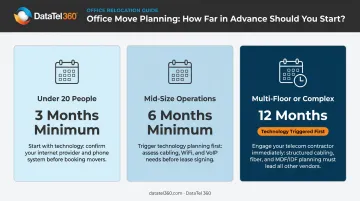
The phases below map to these timelines proportionally.
Phase 1: 6–12 Months Out — Strategic Foundation
Start here before anything else is decided.
- Review your current lease for termination clauses, notice periods, and restoration obligations (restoration costs are frequently overlooked until the final bill arrives)
- Build a realistic budget with separate line items for movers, IT setup, structured cabling, new furniture, signage, cleaning, and a 10% contingency on construction and fit-out work (per Cushman & Wakefield's 2026 Americas Fit-Out Cost Guide)
- Appoint a single project lead who owns the decision log, vendor list, and timeline outright, rather than a committee with diffused accountability
- Assemble a moving committee with representatives from management, IT, HR, and facilities to inform decisions without creating bottlenecks
Tip: Before signing a lease, assess the new space's floor plan against your actual workspace goals : growth capacity, hybrid work support, collaboration zones, or downsizing. Reconfiguring a layout after the lease is signed costs significantly more than getting this right upfront.
Phase 2: 3–6 Months Out — Logistics and Vendor Coordination
This is where planning becomes concrete.
- Develop a detailed floor plan for the new office with department zones and seat assignments
- Conduct a full furniture and equipment inventory: what moves, what gets sold or donated, and what gets recycled
- Source and book commercial movers experienced in office relocations . Get at least 3 quotes, and verify they carry appropriate liability coverage for business equipment
- Issue an employee communication package: timeline, FAQ document, and a named point of contact for questions
- Begin notifying external stakeholders: landlord, key clients, vendors, banks, and insurance providers
Important: Order new furniture, signage, and specialized equipment now. Coalesse's 2026 production schedule shows ranges from 4 weeks for standard seating to 26 weeks for select configurations. Get written production and delivery dates for every item on your bill of materials before assuming availability.
Phase 3: 1–3 Months Out — Execution Preparation
- Implement a color-coded packing and labeling system organized by department and destination room (example: "Finance – Room 204 – Open First")
- Begin packing non-essential items first: archives, storage, seasonal materials, reference files
- Confirm all access logistics : loading dock reservations, freight elevator bookings, parking permits, and security access at both buildings
- Develop a client-facing communications plan: address update announcements, website update schedule, and Google Business Profile timing
The Technology & Telecom Infrastructure Checklist
Technology setup is consistently the most underestimated component of an office move and the leading cause of Day 1 failure. Internet provisioning, structured cabling, phone system migration, and server setup each carry their own lead times and dependencies. Run these as a parallel planning track from the 3–6 month phase, not a final-week scramble.
Structured Cabling and Network Infrastructure
The new office's existing cabling infrastructure should be assessed as early as possible — ideally before the lease is signed. What you find in the walls directly affects your fit-out budget and timeline.
Key steps:
- Survey the existing cabling and determine whether it meets current performance standards or requires a full installation
- Complete Cat6 or Cat6A structured cabling installation and certify it before any IT equipment arrives
- Map Wi-Fi access point placement against the actual floor plan using predictive RF modeling (simulating coverage against architectural drawings before build-out), then confirming results with an on-site validation survey
DataTel 360 performs both predictive and on-site wireless surveys as part of office relocation engagements. Every cabling project includes Fluke-certified copper testing, OTDR-tested fiber, labeled panels, and as-built drawings at project completion, so IT teams have an accurate infrastructure record from day one.
Phone System and VoIP Migration
An office move is a natural checkpoint to evaluate whether your current phone system still fits the business.
- On-premise PBX requires physical relocation and hardware reconfiguration ; it's also a practical moment to evaluate whether cloud migration makes more sense
- Number porting timelines vary: RingCentral's porting guidance estimates 5–10 business days for standard ports; large ports (100+ numbers) average 21 business days and can stretch to 30–45 days depending on the carrier
- VoIP systems require adequate bandwidth and properly configured Quality of Service (QoS) settings at the new location ; VLAN segmentation and network-level configuration must be complete before cutover
- Cloud-hosted platforms like Zultys and Intermedia offer more flexibility for hybrid or multi-location workforces
DataTel 360 is certified on both Zultys and Intermedia platforms. For office move VoIP migrations, they coordinate after-hours cutovers, verify infrastructure alignment before cutover, and build continuity plans to keep phones live through the transition.
Internet and Connectivity
- Confirm fiber availability at the new address before signing a lease
- ISP provisioning timelines are address-specific and carrier-specific. AT&T notes installation can occur within approximately 10 days at fiber-ready locations; at other addresses, deployment timelines are order-dependent and can run significantly longer
- Plan for a backup internet circuit ; a secondary failover path means a single ISP outage won't take the business offline during the most vulnerable stretch of the move
Data Backup and Server Relocation
With connectivity confirmed, the focus shifts to protecting and relocating your data and server hardware.
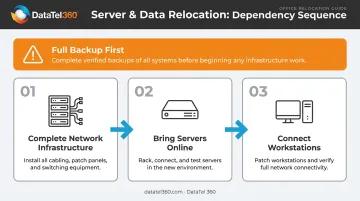
- Complete full backups of all servers and workstations before any equipment is moved
- Establish a chain-of-custody plan for sensitive hardware and data
- Follow the dependency sequence: complete network infrastructure installation first, bring servers online second, connect workstations third
Moving Day & Post-Move Checklist
Moving Day Execution
Command structure matters on move day:
- The project lead must be present — or have a trusted delegate — covering both the old and new locations simultaneously
- Movers should carry a printed floor plan with labeled room assignments, not instructions relayed verbally on the day
- An inventory master list verifies every item arriving at the new space
- Protect walls, floors, and elevator interiors before loading begins
IT cutover sequence:
- Phone and network lines switch over during a planned downtime window — evenings or weekends are strongly preferred
- Keep a vendor contact sheet on hand: IT support, movers, landlord, and utility providers
- Before any employees arrive, verify that internet, phones, HVAC, security systems, and emergency exits are all operational
With move day wrapped, the next two weeks determine how smoothly operations resume.
Post-Move: First 1–2 Weeks
- Unpack and set up priority areas first: IT infrastructure, reception, and core operations
- Run full system tests: phones, internet, printers, conference room AV, and guest Wi-Fi
- Log and resolve any issues within 48 hours — don't let small problems sit
- Update all business listings: website, Google Business Profile, bank accounts, subscriptions, insurance, and vendor portals
- Collect structured employee feedback via a short survey — surface setup problems quickly before they become habits
Don't underestimate the value of acknowledging the team's effort. A brief gathering after the move — even informal — marks the transition as a milestone rather than just a logistical disruption.
Common Office Relocation Mistakes to Avoid
The most damaging planning errors follow predictable patterns:
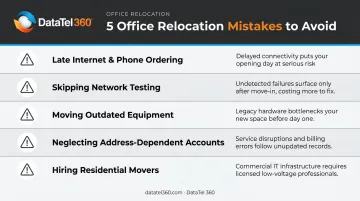
- Ordering internet or phone service too late — resulting in Day 1 outages that can last days, not hours
- Failing to test the new space's network infrastructure before employees arrive
- Moving legacy furniture or outdated equipment that costs more to transport than to replace
- Neglecting address-dependent accounts: payroll providers, state licensing, delivery services, and bank accounts
- Hiring residential movers instead of commercial specialists who understand server handling, elevator logistics, and proper liability coverage for business assets
The most persistent misconception is that IT setup can be handled in the final two to three weeks before the move. It cannot. Structured cabling installation, ISP provisioning, phone number porting, and cloud system configuration each require their own lead time — and those timelines run concurrently with everything else. Start technology planning the moment a lease is signed, not after one is finalized.
Beyond scheduling, budget overruns typically trace back to two sources: underestimating technology setup costs, and failing to account for productivity losses during the transition window. JLL's 2026 U.S. and Canada Office Fit-Out Costs Guide reports that security, IT, and AV account for approximately 10–12% of total fit-out cost — a line item many businesses underbudget or omit entirely in early estimates. Build both technology costs and transition downtime into your initial budget, not as an afterthought.
Frequently Asked Questions
How much does it cost to relocate an office?
Costs vary by company size, distance, and IT complexity — construction and fit-out alone average $295 per square foot in mid-quality U.S. markets, according to JLL. Request itemized quotes for movers, cabling, IT setup, furniture, and signage, then add a 10% contingency to the build-out portion.
How do I plan an office relocation?
Appoint a single project lead, assemble a moving committee, and work from a phase-by-phase checklist covering vendors, communications, and logistics. Larger operations should start 6–12 months out; ISP and cabling engagement should happen as early as possible regardless of overall timeline.
How far in advance should I start planning an office move?
Small offices under 20 employees need at least 3 months. Mid-size operations need 6 months. Multi-floor or complex environments should begin 12 months out. Technology and internet provisioning should be triggered first in any timeline; these carry the longest and least predictable lead times.
How do I minimize downtime during an office move?
Schedule the physical move over a weekend or off-hours. Ensure structured cabling and internet are installed and tested at the new location before employees arrive, and confirm phone systems are live before move day. Pre-testing every system — not just installing it — is what actually prevents Day 1 outages.
What technology needs to be set up before moving day?
Structured cabling, internet provisioning, VoIP or cloud phone system configuration, Wi-Fi access point installation, server setup, and security system activation must all be completed and tested before employees arrive at the new location.
What is the biggest mistake companies make during an office move?
Treating technology infrastructure as a last-minute task. ISP provisioning, structured cabling installation, and phone number porting each have lead times measured in weeks — not days. Starting these processes late almost always results in Day 1 outages and a productivity disruption that extends well beyond the first week.