Introduction
Patient communication expectations have never been higher — and the cost of falling short is measurable. A 2023 PureSpectrum survey of more than 2,000 patients found that 59% would switch providers after a broken communication experience. Yet many practices still run on aging, hardware-dependent phone systems that weren't designed for telehealth workflows, multi-location operations, or today's compliance requirements.
That disconnect has real consequences — missed appointments, frustrated patients, and staff stretched across systems that don't talk to each other. Cloud-based phone systems address these problems directly, without requiring a full facility overhaul.
This guide covers how cloud-based phone systems work, why they matter for healthcare operations, and which features and compliance safeguards are non-negotiable — including what to look for when choosing an implementation partner.
Key Takeaways
- Cloud VoIP replaces costly on-site hardware with scalable, internet-delivered communication that supports both in-office and remote care teams
- Native EHR integration reduces manual data entry and speeds up care coordination
- HIPAA compliance requires encryption, audit trails, and a signed Business Associate Agreement (BAA)
- Vendor-neutral implementation partners match the right system to your practice size and specialty — no brand bias
How Cloud-Based Phone Systems Work in Healthcare
From Copper Lines to Cloud-Hosted PBX
The FCC defines VoIP as technology that enables voice calls over a broadband internet connection rather than a regular analog line. In practice, that means voice is converted into encrypted digital packets and transmitted over the internet — no physical telephone line required.
Calls are routed through a cloud-hosted PBX (private branch exchange), which means any internet-connected device — desk phone, smartphone, tablet, or laptop — can serve as a full business line. For healthcare staff who move between offices, work remotely, or take on-call rotations, that flexibility matters.
Legacy Systems vs. Cloud Infrastructure
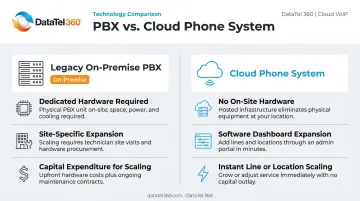
Traditional on-premise PBX systems require dedicated hardware, physical maintenance, and site-specific expansion. Adding a new clinic location means buying and installing equipment at that site. Moving or scaling requires an on-site technician and capital expenditure.
Cloud systems reverse that dependency. Key differences include:
- Infrastructure: Lives in the vendor's data centers — no on-site hardware to maintain
- Expansion: Handled through a software dashboard, not a procurement cycle
- Scaling: Add lines or locations without scheduling a technician visit
SIP Trunking: The Transition Bridge
Most healthcare organizations can't switch systems overnight — patient call volume, regulatory requirements, and existing infrastructure all create migration complexity. SIP (Session Initiation Protocol) trunking addresses this by connecting cloud-hosted systems to traditional telephone networks. A practice can modernize its communication platform without immediately severing existing phone lines — a practical bridge for phased migrations.
Key Benefits of Cloud Phone Systems for Healthcare Organizations
Improved Patient Access
Smart call routing and IVR (Interactive Voice Response) menus direct patients to the right department — scheduling, billing, triage, or a specific provider — without live operator involvement.
The stakes are real: a study of 285 VA facilities covering 252,145 patients found that slower phone answer speeds were associated with worse urgent-care access ratings. Patients in the slowest answer-speed quartile (107–351 seconds) had measurably lower odds of getting an urgent appointment than those in the fastest quartile.
Operational Efficiency for Staff
According to an MGMA poll of 294 practice leaders, 45% cited eligibility and prior authorization as the most time-consuming phone task, and 31% pointed to scheduling. Cloud systems address this directly through:
- Voicemail-to-email transcription
- Automated appointment reminders
- Automatic call logging
- IVR self-service for routine inquiries
Front-desk staff spend less time triaging calls manually — and more time on tasks that require a human.
Flexibility for Multi-Location and Remote Teams
Cloud systems unify multiple clinic locations and remote staff under one communication platform with a single management dashboard. A provider rotating between three offices maintains one business number across all devices. A telehealth team working from home operates with the same features as in-office staff.
For healthcare groups opening satellite clinics or managing distributed care teams, that consistency across sites reduces administrative friction and keeps patient communication standardized.
Scalability Without Capital Investment
On-premise PBX requires hardware purchases, maintenance contracts, and costly upgrades every few years. Cloud systems eliminate that cycle. Adding lines, locations, or features happens through software — no hardware orders, no technician dispatched just to provision a new user. That makes scaling for a new clinic or a seasonal call volume spike a matter of hours, not weeks.
Business Continuity and Disaster Recovery
Because cloud systems store data across multiple geographically distributed servers, operations continue through local outages, infrastructure failures, or natural disasters that would knock out an on-premise system entirely.
The Joint Commission directs healthcare organizations to plan alternate communication processes during cyber-related downtime. For healthcare organizations, a cloud system with geographic redundancy is a direct patient safety measure — not an optional upgrade.
HIPAA Compliance, Security, and Data Privacy
What HIPAA Actually Requires
Under 45 CFR 164.312, cloud phone systems handling electronic Protected Health Information (ePHI) must implement:
- Access controls and unique user identification
- Audit controls and integrity controls
- Transmission security
HIPAA's encryption and multi-factor authentication specifications are technically "addressable" — meaning covered entities (healthcare providers, insurers, and their partners) must assess whether they're reasonable and appropriate, then implement them or document an equivalent alternative. For cloud phone systems transmitting ePHI, encryption is almost always the right call.
HHS is explicit that a cloud provider handling ePHI — even if it stores encrypted data without holding the decryption key — qualifies as a business associate and must sign a BAA.
What to Verify Before Selecting a Provider
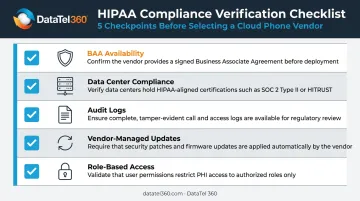
Before committing to any cloud phone vendor, confirm these compliance checkpoints:
- BAA availability — Confirm the vendor will sign a Business Associate Agreement before any ePHI touches their infrastructure
- Data center compliance — Servers should meet HIPAA physical and administrative safeguard requirements, not just logical security controls
- Audit logs — Call activity should be documented in tamper-evident records accessible for compliance review
- Vendor-managed updates — Security patches should deploy automatically, without requiring manual intervention on your end
- Role-based access — Staff access should be restricted by role, so a front-desk coordinator can't reach clinical call records
Compliance Without Sacrificing Usability
HIPAA-compliant cloud platforms have come a long way. Modern options support mobile apps, voicemail transcription, video conferencing, and third-party integrations — as long as those integrations carry their own HIPAA compliance. The key is deliberate vendor selection, not settling for a stripped-down system.
EHR Integration and Administrative Efficiency
How VoIP Connects to EHR Platforms
In 2024, 95% of U.S. office-based physicians had adopted some form of EHR, making EHR interoperability a core requirement — not a nice-to-have — for any cloud phone system serving healthcare.
The integration mechanism is API-based. When a known patient calls in, the system pulls up their EHR record in real time — a screen pop that arrives before the first word of the conversation. From there:
- Calls are automatically logged directly into the patient chart
- Appointment data syncs to trigger outbound reminder calls
- Staff see relevant clinical context without switching applications
Platforms like Intermedia — one of the systems DataTel 360 deploys — support screen pops powered by EHR data, plus call recording options that integrate directly with practice management workflows. Zultys, another platform in DataTel 360's toolkit, offers similar unified communications capabilities designed for clinical environments.
Streamlining Billing, Scheduling, and Follow-Up
Integration with scheduling tools enables automated appointment confirmations and follow-up calls. Billing platform connections let staff pull account status mid-call without switching systems. Both reduce how long each call takes and cut the errors that come from re-entering data by hand — outcomes that compound across hundreds of patient interactions each week.
Supporting Care Team Collaboration
Unified communication features — internal extensions, presence indicators, group messaging, video conferencing — remove the routing bottlenecks that delay clinical decisions. A physician can pull in a specialist or lab technician mid-conversation without going through a central switchboard. That direct connection shortens the gap between a question and an answer — which matters when care decisions are time-sensitive.
Must-Have Features for a Healthcare Cloud Phone System
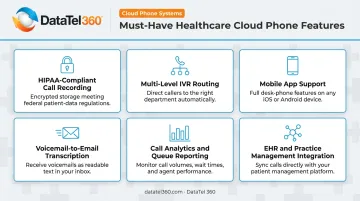
Any system under evaluation should include the following:
- HIPAA-compliant call recording with encrypted, access-controlled storage
- Multi-level IVR with department and provider routing
- Mobile app support for on-call providers and remote staff
- Voicemail-to-email transcription with secure delivery
- Call analytics and queue reporting for monitoring wait times and abandonment rates
- EHR and practice management API integration — native or well-documented
Vendors such as Intermedia offer financially backed 99.999% uptime guarantees — roughly five minutes of downtime per year. For healthcare, where communication gaps directly affect patient safety, that benchmark is the floor, not a selling point. Ask any vendor for their SLA in writing before committing.
The phone system should also connect natively with the EHR, CRM, and scheduling platforms already in use. Systems requiring costly custom middleware add deployment complexity and long-term maintenance risk. Prioritizing native integration up front saves significant time and budget during rollout.
Common Challenges When Adopting Cloud Phone Systems in Healthcare
Legacy System Integration Complexity
Integrating cloud VoIP with older EHR platforms or proprietary on-premise hardware creates real compatibility friction. SIP trunking can bridge some of that gap, but a phased migration plan is essential to avoid disrupting active patient-facing operations.
DataTel 360 supports legacy PBX systems and builds structured migration paths — including after-hours cutovers and continuity planning that keep practices running throughout the transition.
Staff Training and Change Management
An effective onboarding program for a cloud phone rollout should cover:
- Role-specific sessions for front-desk staff, nurses, and administrators — each group has different feature needs
- Hands-on walkthroughs of new call flows and IVR configurations before go-live
- Compliance protocol review so staff understand how ePHI is handled on the new system
- Post-launch technical support access, not just day-one assistance
Internet Dependency and Network Readiness
Cloud phone performance depends entirely on network quality. Cisco's guidance recommends:
- One-way latency: No more than 150 ms
- Jitter: No more than 30 ms
- Packet loss: No more than 1%
Before migration, conduct a network readiness assessment covering bandwidth capacity, QoS (Quality of Service) configuration, and redundant internet connections. Skipping this step is one of the most common oversights in cloud phone deployments, and one of the most disruptive.
Choosing the Right Cloud Phone Partner for Your Healthcare Practice
Features and pricing are table stakes. The partner you choose determines whether your migration succeeds or stalls. Key selection criteria:
- Healthcare industry experience — the partner should understand clinical workflows, compliance requirements, and the stakes of communication downtime in a care environment
- Vendor-neutral recommendations — a partner locked into a single platform will fit your practice to their product, not the other way around
- Certified engineers who handle both initial design and ongoing support
- 24/7 emergency availability — healthcare communication failures don't respect business hours
DataTel 360 brings over 25 years of telecommunications infrastructure experience to healthcare clients across Atlanta, the Southeast, and nationwide. With certified expertise in both Intermedia and Zultys, DataTel 360 operates as a vendor-neutral partner — recommending the right platform for each practice's size, specialty, and existing infrastructure rather than defaulting to a single brand.
Services cover the full implementation lifecycle: system design, cloud VoIP migration, structured cabling, and ongoing support, with 24/7 live dispatch available for emergencies. A single accountable project team coordinates multi-site healthcare rollouts, with standardized deployment processes regardless of geography.
Once you've identified a qualified partner, here's how to move the evaluation forward:
- Conduct a communication audit — document current call volumes, pain points, and integration dependencies
- Request vendor demos that include HIPAA compliance documentation and a signed BAA
- Verify the partner can deliver a phased migration plan that keeps patient-facing operations running throughout the transition
Contact DataTel 360 at 770-441-9999 or sales@datatel360.com to start that conversation.
Frequently Asked Questions
How much does a HIPAA-compliant healthcare cloud phone system cost?
Pricing varies by practice size, number of users, and features required — most cloud systems use a per-user monthly subscription model. HIPAA-compliant tiers may carry additional costs for encrypted storage and BAA agreements. Ask vendors for a quote based on your user count, location count, and required features.
What is VoIP and how does it integrate with EHR systems?
VoIP converts voice calls into digital data transmitted over the internet. It connects to EHR systems via APIs to enable real-time patient record screen pops, automatic call logging into patient charts, and synchronized scheduling reminders.
What is the best phone system for a medical office?
The best fit depends on practice size, number of locations, and existing technology. Non-negotiables include HIPAA compliance, EHR integration capability, multi-level IVR, mobile access for on-call providers, and a vendor willing to sign a BAA.
Can cloud phone systems support telehealth and remote care teams?
Yes. Cloud systems are not tied to any specific device or location. Remote and hybrid staff use the same business number and features from any internet-connected device, making them well-suited for telehealth workflows and distributed care teams.
What are the biggest security risks of using VoIP in healthcare?
NIST identifies eavesdropping, toll fraud, unauthorized access, and denial-of-service attacks as primary VoIP risks. HIPAA-compliant providers address these through encryption, role-based access controls, strong authentication, and documented incident response plans.