Introduction
When a business grows (more employees, more devices, more floor space), the infrastructure that suffers first is usually the one nobody planned for: low voltage cabling. It gets treated as an afterthought, installed piecemeal by separate vendors, or sized for the company as it exists today rather than the company it's becoming.
The result is dropped connections, security systems that behave unreliably, and expensive retrofits through finished walls and ceilings.
According to the Uptime Institute's 2024 outage analysis, 54% of significant outages cost more than $100,000 — a figure that puts poor infrastructure planning firmly in the category of business risk, not just IT inconvenience.
This guide is written for facility managers, business owners, and IT decision-makers who want a practical framework for planning low voltage cabling that supports growth from the start — not one that creates a rebuild problem in three years. It covers cabling standards, capacity planning, MDF/IDF design, and how to evaluate a contractor who can handle the work correctly.
Key Takeaways
- Low voltage cabling covers data networks, VoIP, surveillance, access control, Wi-Fi, and AV — plan all systems together, not separately
- Cat6a is the right baseline for new commercial installations — it supports 10-Gbps speeds and provides adequate PoE headroom for modern devices
- Empty conduit installed during build-out is the highest-ROI future-proofing step available
- Plenum-rated (CMP) cable is a code requirement in air-handling spaces — not a recommendation
- Missing documentation from the original installer is a leading driver of high re-cabling costs
What Is Low Voltage Cabling in a Commercial Building?
Low voltage cabling handles data transmission, communication signals, and device control — not power delivery. Commercial buildings run two distinct electrical tiers: line-voltage systems (120V–240V) for power and lighting, and low voltage systems for everything that communicates.
Systems Classified as Low Voltage in Commercial Buildings
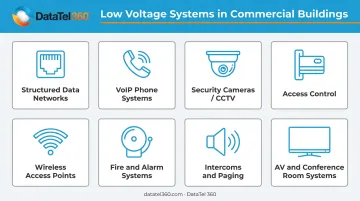
A fully built-out commercial space typically includes multiple low voltage systems operating simultaneously:
- Structured data networks — Cat6, Cat6a copper and fiber optic backbone
- VoIP phone systems — voice over IP running entirely over data cabling
- Security cameras (CCTV) — IP-based surveillance with Power over Ethernet
- Access control — card readers, keypads, and electronic door hardware
- Wireless access points — fed by wired PoE connections
- Fire and alarm systems — life safety signaling infrastructure
- Intercoms and paging — including warehouse paging in larger facilities
- AV and conference room systems — display, audio, and control cabling
Each system depends on its own wiring type. Planning them independently — the most common mistake in commercial buildouts — leads to duplicate pathways, conflicting conduit runs, and cabling that can't support future adds without significant rework.
Commercial vs. Residential Installations
Commercial low voltage work differs from residential in several key ways: higher device counts, stricter fire and building code compliance, centralized telecom rooms (MDF/IDF), redundancy requirements, and far greater bandwidth demands.
The TIA-568.1-E standard (published 2020) governs commercial building cabling. Residential premises fall under the separate TIA-570 series. The two standards address fundamentally different installation environments and should not be applied interchangeably.
Key Low Voltage Systems Supporting Commercial Growth
Structured Data Networking
Copper and fiber cabling form the backbone of business connectivity — supporting cloud applications, video conferencing, internal data sharing, and every device connected to the network. The cable category chosen at installation sets the bandwidth ceiling for years.
BICSI's 2022 standards briefing puts Cat6a at 500 MHz bandwidth with 10GBASE-T support to 100 meters — compared to standard Cat6, which is limited to roughly 55 meters for 10G. For new commercial installations, Cat6a is the defensible baseline. Fiber is appropriate for backbone runs between floors or buildings where distances exceed copper's 100-meter channel limit.
VoIP and Unified Communications
Modern business phone systems don't use traditional copper phone lines. Metrigy reports that 50.4% of businesses now use UCaaS as their sole communications platform, meaning reliable data cabling infrastructure is a prerequisite — not a supporting element — for voice communications. Degraded cable runs directly translate to choppy calls and dropped connections.
Security, Surveillance, and Access Control
IP cameras consolidate video and power delivery onto Ethernet via PoE, increasing demand on switch capacity, cable bundles, and heat loads in telecom rooms. Access control systems — card readers, biometric scanners, electronic door locks — require dedicated low voltage runs back to a central control panel.
Design both systems alongside network cabling from the start — not as an afterthought. Key reasons this matters:
- Camera and access point locations expand as headcount and square footage grow
- Retrofitting runs through finished walls and ceilings is costly and disruptive
- Shared conduit and pathway planning reduces overall installation labor
Wireless Access Points and Building Automation
Wi-Fi performance is directly dependent on physical wired infrastructure. Every wireless access point requires at least one (ideally two) wired PoE connections — ANSI/TIA-568.1-E specifies at least two Cat6a or higher runs to each WAP. As Wi-Fi 6 and 6E become standard and IoT device counts climb (commercial building IoT endpoints are projected to grow from approximately 2 billion in 2025 to 4.12 billion by 2030), the wired backbone carries significantly more load than it did even five years ago.
Best Practices for Planning Low Voltage Cabling in Growing Spaces
Conduct a Thorough Needs Assessment Before Installation Begins
Effective planning starts with a complete picture of current and projected requirements:
- Current device counts across all low voltage system types — not just network drops
- Anticipated headcount growth over a 3–5 year horizon
- Bandwidth-intensive applications in use (video conferencing, cloud storage, large file transfers)
- Physical spaces that will require access control, surveillance, or AV coverage
- Telecom room sizing and power/cooling requirements for PoE load
The most common planning failure is scoping only for today's network. Businesses that skip this step typically find themselves cutting into finished ceilings within two years — at three to five times the original installation cost.
Design for Capacity Beyond Current Requirements
Install conduit pathways and cable runs rated above immediate needs. Empty conduit installed during initial construction costs a fraction of retrofit work — cutting into finished walls, restoring ceilings, and working around occupied spaces adds labor, materials, and disruption that dwarf the original conduit cost.
For copper, Cat6a is the recommended minimum for new commercial installations where 10-Gbps performance or advanced PoE is anticipated. For backbone runs between floors or buildings, fiber is the appropriate choice:
| Fiber Type | Application | Standards Reach |
|---|---|---|
| OM3 Multimode | In-building backbone | 300 m at 10G |
| OM4 Multimode | In-building backbone | 400 m at 10G |
| Single-mode | Campus / long runs | 10 km at 10G |
Separate Low Voltage from High-Voltage Wiring
Running data cables parallel to or bundled with standard electrical lines creates electromagnetic interference (EMI) that degrades network performance and signal quality. NEC Article 725 requires a 2-inch (50 mm) separation from power and Class 1 conductors as a baseline, with exceptions when either system is enclosed in qualifying raceway. Verify requirements with the local authority having jurisdiction (AHJ) based on the adopted NEC edition.
In EMI-prone environments — near large motors, electrical panels, or industrial equipment — shielded cabling (STP) provides additional protection.
Centralize Cable Management with a Properly Designed Telecom Room
A well-built MDF (Main Distribution Frame) or IDF (Intermediate Distribution Frame) closet is what makes a structured cabling system actually manageable over time. Key elements of a properly designed telecom room include:
- Professional rack and patch panel installation with logical port organization
- Cable management hardware that maintains separation and reduces strain
- Every drop labeled and every panel mapped at installation — not retroactively
- Certified test documentation (Fluke for copper, OTDR for fiber) included at project closeout
- As-built drawings delivered to the client's IT team
DataTel 360 treats MDF/IDF buildouts as a core discipline — every project includes labeled panels, certified test reports, and as-built drawings as standard deliverables, not optional extras.
Use Plenum-Rated Cabling in Air-Handling Spaces
Plenum spaces — the areas above drop ceilings and below raised floors used for HVAC air circulation — require CMP-rated (plenum) cable under the NEC. The requirement exists because air-handling spaces can rapidly spread toxic smoke from burning cable insulation. This is a code requirement, not a design preference. Standard CM or CMR cable in a plenum space is a code violation.
Partner with a Certified Contractor Who Takes a Systems-Wide View
The most damaging planning mistake is hiring separate vendors for networking, security, AV, and access control. Fragmented installation creates incompatible infrastructure, gaps in documentation, and no single point of accountability when systems fail.
A single-source contractor who designs and installs all low voltage systems under one scope produces infrastructure that's coherent, documented, and easier to expand. DataTel 360 has delivered multi-discipline low voltage scopes across Atlanta and the Southeast since 1998 — combining structured cabling, fiber, CCTV, voice, data, and AV under a single engagement and a single set of as-built documents.
Future-Proofing: Designing a Cabling Infrastructure That Scales
Plan Physical Pathways for Future Expansion
Empty conduit is the single highest-ROI future-proofing step available during construction. It costs very little when installed alongside active cable runs and allows future pulls without disrupting operations, finished ceilings, or occupied spaces. Document conduit locations in as-built drawings so future contractors can use them.
Cat6a and Fiber: Why Spec Above Current Needs
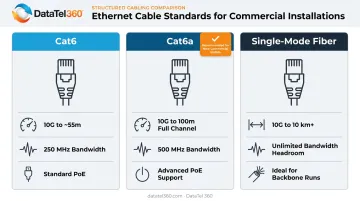
Specifying above current requirements is one of the cheapest insurance policies in cabling design. Key differences:
- Cat6a: 500 MHz bandwidth, full 100-meter 10GBASE-T support — no distance compromises
- Cat6: Supports 10G only to ~55 meters, a real constraint in larger commercial spaces
- Single-mode fiber: Best choice for backbone runs, with standards reach extending to 10 km and beyond
Build In Redundancy at Critical Points
For mission-critical systems — security infrastructure, VoIP, core data networks — single-path cabling is a liability. Redundant pathways matter most in:
- Healthcare facilities where network downtime affects patient care systems
- Financial services where transaction processing cannot tolerate interruptions
- Logistics and distribution centers where warehouse operations depend on continuous connectivity
Redundant pathways mean both links must follow physically separate routes. Two cables bundled in the same conduit are not redundant — a single dig or ceiling collapse takes both down.
Documentation That Prevents a $5,000 Re-Cabling Bill
Complete as-built drawings, a consistent cable labeling scheme, and patch panel documentation aren't nice-to-haves. They're what separates a $200 troubleshooting call from a $5,000 infrastructure audit. Poor documentation is one of the primary reasons growing businesses face high re-cabling costs when they change vendors or expand.
DataTel 360's standard project turnover includes Fluke-certified copper test reports, OTDR-tested fiber documentation, labeled panels, and as-built drawings — delivered as a verifiable record, not a verbal promise.
Compliance and Safety: What Commercial Buildings Must Get Right
Follow the NEC and Local Building Codes
Getting compliance right starts with knowing which rules apply. Commercial low voltage installations are governed by the NEC, with relevant articles including:
- Article 725 — Class 1, 2, and 3 control and signaling circuits
- Article 805 — Communications circuits (newer NEC editions)
- Article 820 — CATV and coaxial distribution systems
NEC classification is based on the power source and applicable voltage/power limits , not a blanket "50V or less" definition. Always verify the locally adopted NEC edition and confirm requirements with the AHJ before procurement.
Most jurisdictions require permits and inspections for commercial low voltage work. Licensing requirements vary by state , so working with a certified contractor protects against failed inspections and code violations.
Fire Safety: Cable Jacket Ratings
The NEC establishes three main cable jacket classifications based on where cable is installed:
| Rating | Marking | Required Location |
|---|---|---|
| Plenum | CMP | Air-handling plenums and ducts |
| Riser | CMR | Vertical shafts between floors |
| General Purpose | CM | Other locations |
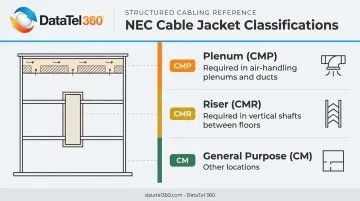
Using a lower-rated cable in a higher-rated space (for example, CM cable in a plenum) is a code violation. Each rating reflects the fire propagation risk specific to that location — installing the wrong jacket type is one of the most common compliance failures inspectors flag.
A Note on Romex in Commercial Buildings
NEC Article 334 permits Type NM (Romex) cable in certain nonresidential structures under specific conditions involving building construction type. However, Article 334.12 restricts its use in exposed runs above suspended ceilings in nonresidential occupancies.
In practice, most commercial buildings require cables with higher mechanical durability and fire-resistance ratings than Romex provides. Confirm the applicable rule with the AHJ for your specific building type and jurisdiction.
Warning Signs Your Cabling Can't Keep Up With Business Growth
These symptoms point to infrastructure — not devices — as the root cause:
- Network slowdowns or inconsistent speeds, often caused by Cat5e cabling in environments that need 10G, degraded runs from physical damage, or too few drops creating congestion
- Every expansion requires cutting into finished walls — a sign the original installation had no capacity planning built in
- Security cameras dropping feeds, access readers failing intermittently, or AV cutting out mid-meeting — these typically trace back to aging or incorrectly installed cabling, not the devices themselves
If any of these describe your current environment, a physical-layer audit — including certified Fluke testing and pathway assessment — is the right starting point before investing in new equipment.
Frequently Asked Questions
What is considered low voltage in a commercial building?
Low voltage in commercial buildings covers systems operating well below standard power circuits — data networks, VoIP, security cameras, access control, and AV. The NEC classifies these under Articles 725, 805, and 820 based on the power source and applicable limits, not a single voltage threshold.
What is low voltage cabling used for?
Low voltage cabling supports any system that carries signals or controls devices rather than delivering standard power. Common commercial applications include:
- Structured data networking and Wi-Fi infrastructure
- VoIP communications and paging
- CCTV surveillance and access control
- Fire and alarm systems, intercoms, and audiovisual systems
How far can you run a low voltage cable?
Standard Ethernet (Cat5e through Cat6a) supports a maximum 100-meter channel per TIA-568, made up of a 90-meter permanent link plus patch cords. Fiber reaches much farther — OM4 multimode handles 400 meters at 10G, and single-mode supports 10 km and beyond for long backbone runs.
Why is Romex not commonly used in commercial buildings?
NEC Article 334.12 restricts Type NM cable in exposed runs above suspended ceilings in nonresidential occupancies. Commercial construction requires higher mechanical durability, specific fire-resistance ratings, and plenum or riser jacket types that standard Romex does not meet. Confirm the applicable rules with your local AHJ.
What cable category should I install for a new or growing commercial space?
Cat6a is the defensible baseline for new commercial installations — it supports 10-Gbps speeds across the full 100-meter channel and handles advanced PoE loads better than Cat6. Fiber optic backbone runs are recommended for longer distances between floors or buildings, or where significant bandwidth growth is anticipated.
Do I need permits or a licensed contractor for low voltage cabling in a commercial building?
Most jurisdictions require permits and inspections for commercial low voltage installations. Licensing requirements vary by state. Working with a certified contractor — one who handles permitting and AHJ coordination — ensures code compliance and avoids failed inspections or liability issues down the road.