Introduction
Picture this: it's 9 AM on a Monday, your team is filing in, and nothing works. The network is down, applications won't load, and customer calls are dropping. Within an hour, you're calculating what this outage is actually costing — and the number is uncomfortable. According to Uptime Institute's 2025 survey, 20% of significant data center incidents exceed $1 million in costs, and 37% fall between $100,000 and $1 million.
Those costs trace back to infrastructure decisions made — or skipped — long before the outage ever happened.
This guide gives you a clear picture of what data center infrastructure is, how its core components fit together, which deployment model fits your operation, and what to look for in a partner who can keep it all running reliably.
Key Takeaways
- Physical and virtual infrastructure layers are interdependent; a single failure point can cascade across your entire operation
- 87% of significant outages could have been prevented with better management, processes, or configuration
- Tier standards define fault tolerance, not specific uptime guarantees — choose based on your actual business risk tolerance
- PUE is the primary energy efficiency benchmark; the 2025 industry average is 1.54
- Business-critical environments require a vendor-neutral infrastructure partner with documented, enforceable SLAs
What Is Data Center Infrastructure?
Data center infrastructure is the combined physical and virtual systems that enable an organization to store, process, and deliver data reliably: servers, storage, networking equipment, power supplies, cooling mechanisms, and management software.
Every business outcome tied to technology depends on it — uptime, application performance, security, scalability. The stakes are growing fast.
According to the IEA, data centers consumed 415 TWh of electricity in 2024 — roughly 1.5% of global electricity — with demand growing about 12% annually. By 2030, that figure is projected to nearly double to 945 TWh.
Deployment Models at a Glance
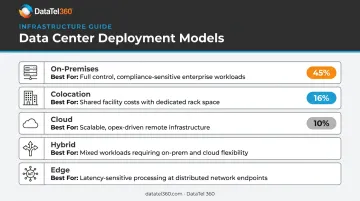
Uptime's 2025 survey found workloads split across 45% corporate facilities, 16% colocation, and 10% public cloud — most organizations aren't running a single model. They're managing several at once.
| Model | Best For |
|---|---|
| On-premises | Organizations needing direct control over hardware and data, willing to carry capital and staffing costs |
| Colocation | Businesses wanting predictable facility costs without full ownership — you own the gear, they own the building |
| Cloud | Teams prioritizing flexibility and speed over infrastructure control |
| Hybrid | Enterprises coordinating workloads across corporate facilities, colocation, and cloud — currently the most common real-world model |
| Edge | IoT, manufacturing, or latency-sensitive applications where compute must live close to the data source |
Core Components of Data Center Infrastructure
Modern data center infrastructure isn't a single system — it's a layered stack of interdependent components. A failure in any one layer cascades across the others. Understanding each layer is the first step toward building something that holds.
Computing Resources
Servers are the processing engine — rack servers dominate enterprise environments for their density and manageability. Blade servers pack even more compute into shared chassis. Tower servers suit smaller deployments.
Virtualization changes the economics — running multiple workloads on fewer physical servers improves utilization, reduces hardware sprawl, and simplifies management. Most modern data centers treat bare-metal deployments as the exception, not the rule.
Storage Systems
Storage exists on a spectrum:
- HDDs — high-capacity, cost-effective, appropriate for archival or infrequently accessed data
- SSDs — faster, more expensive, essential for databases and performance-critical workloads
- SANs (Storage Area Networks) — high-speed block storage networks for enterprise applications
- NAS (Network-Attached Storage) — file-level storage accessible across the network
- Cloud storage tiers — flexible, scalable, ideal for backup and disaster recovery
Tiered storage strategies balance performance against cost: fast media for hot data, cheaper media for cold data.
Network Infrastructure
Network infrastructure connects every other component to each other and to the outside world. This includes switches, routers, firewalls, load balancers, and the physical cabling layer underneath all of it.
That physical layer — structured cabling, fiber optic runs, patch infrastructure — is the foundation everything else depends on. Get it wrong and you pay repeatedly: through performance issues, troubleshooting hours, and eventually a costly retrofit.
A qualified installation partner makes the difference here. DataTel 360 provides certified structured cabling and fiber optic installation for commercial and data center environments, covering Cat6/Cat6A copper, single-mode and multimode fiber, fusion splicing, and OTDR-tested certification — with full as-built documentation at turnover.
Power and Cooling Systems
Power and cooling are the life-support layer — without them, everything else fails.
Power redundancy components:
- UPS (Uninterruptible Power Supplies) for immediate failover
- Generators for extended outage coverage
- PDUs (Power Distribution Units) for rack-level power management
Cooling approaches:
- CRAC/CRAH units for precision air management
- Hot/cold aisle containment to prevent mixing of supply and return air
- Liquid cooling for high-density AI and GPU workloads
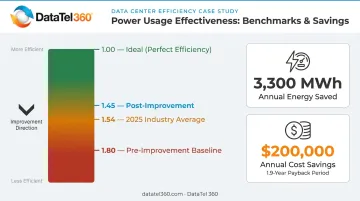
Power Usage Effectiveness (PUE) is the standard efficiency benchmark — calculated as total facility energy divided by IT equipment energy. A PUE of 1.0 is theoretical perfection. Uptime's 2025 weighted-average across 681 respondents was 1.54. A DOE case study found that containment and economizer improvements at one federal facility projected PUE to drop from 1.80 to 1.45, saving 3,300 MWh and $200,000 annually with a 1.9-year payback.
Security Systems
Security operates at two layers — and both require ongoing attention.
Physical security:
- Biometric access controls and key card systems
- CCTV surveillance with retention policies
- Mantrap entries for sensitive areas
Cybersecurity:
- Firewalls and intrusion detection systems
- Encryption in transit and at rest
- Multi-factor authentication
For regulated industries, security planning is infrastructure planning. HIPAA requires physical and technical safeguards protecting electronic patient health information. PCI DSS 4.0.1 restricts physical access to cardholder data environments. SOC 2 examinations assess physical access controls under the CC6.4 criterion. These frameworks don't prescribe specific hardware — but they make security requirements non-negotiable from day one.
Data Center Tier Standards
The Uptime Institute's four-tier classification describes fault tolerance and redundancy architecture — not specific uptime guarantees. Uptime explicitly removed expected-downtime figures from the tier definitions in 2009, noting that management and human factors materially affect actual availability.
| Tier | Architecture | Topology |
|---|---|---|
| Tier I | Single, non-redundant distribution path | N |
| Tier II | Redundant capacity components, single path | N+1 |
| Tier III | Concurrently maintainable — components can be removed without affecting IT | N+1 with multiple paths |
| Tier IV | Fully fault-tolerant — single failure does not affect operations | 2N or 2(N+1) |
Tier selection drives your infrastructure investment, vendor requirements, and risk tolerance. A Tier IV deployment costs considerably more than Tier II — but for organizations where downtime triggers regulatory violations or life-safety risks, the higher tier cost is justified by those consequences alone.
That risk tolerance also shapes your compliance posture. No framework — HIPAA, PCI DSS, or FedRAMP — mandates a specific Uptime tier, but each requires you to demonstrate that your infrastructure matches the sensitivity of what runs on it. A business impact analysis is the practical starting point for that determination.
Best Practices for Data Center Infrastructure Management
Build Redundancy Into the Design
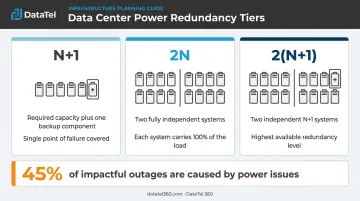
Redundancy bolted on after the fact is expensive and incomplete. The three standard models:
- N+1 — Required capacity plus one additional component; a single failure is covered
- 2N — Two complete, independent systems, each capable of carrying the full load
- 2(N+1) — Two independent N+1 systems; the highest level of redundancy
Failover clustering and redundant network paths protect against single points of failure. Uptime's 2025 data found that power issues caused 45% of impactful outages, followed by network at 14% — both areas where redundancy architecture pays off directly.
Optimize Energy Efficiency
PUE improvement is one of the most direct levers for reducing operating costs:
- Implement hot/cold aisle containment to prevent air mixing
- Consolidate servers through virtualization to reduce idle power draw
- Use intelligent power management tools to identify waste
- Consider economizers or liquid cooling for high-density racks
The DOE case study referenced above achieved a projected $200,000 in annual savings from PUE reduction — with under a two-year payback. For most facilities, that payback window makes energy efficiency upgrades among the highest-ROI infrastructure investments available.
Monitor Continuously
87% of organizations that experienced a significant outage believed it could have been prevented with better management, processes, or configuration. The monitoring infrastructure to catch these issues before they escalate includes:
- 24/7 remote monitoring of power, cooling, and network performance
- DCIM (Data Center Infrastructure Management) software for real-time visibility into capacity, asset inventory, and environmental conditions
- Automated alerting thresholds before conditions become critical
The DCIM market is projected to grow from $3.02B in 2024 to $5.01B in 2029, a 10.6% CAGR — reflecting how central monitoring has become to operational discipline.
Maintain a Layered Security Posture
Security requires active, recurring attention across both physical and digital layers. Ongoing requirements include:
- Regular penetration testing and vulnerability assessments
- Firmware updates across network and server hardware
- Access log audits to detect unusual activity patterns
- Staff training on physical security protocols and phishing recognition
Test Your Disaster Recovery Plan
Documentation alone doesn't validate a recovery plan — execution does. Every DR and business continuity plan should include:
- Defined RTO (Recovery Time Objective) — how long the system can be down before business impact becomes unacceptable
- Defined RPO (Recovery Point Objective) — how much data loss is acceptable, expressed as a time window
- Off-site data replication with confirmed restore procedures
- Tested failover procedures — not just documented ones
NIST defines RTO and RPO as objectives tied to business impact — not universal benchmarks. Your acceptable values should come from a formal business impact analysis specific to your operations, not industry averages.
Choosing the Right Data Center Infrastructure Partner
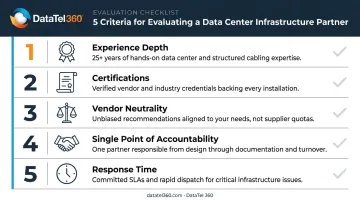
For most businesses — especially those without dedicated in-house data center engineering teams — a qualified infrastructure partner is a practical necessity. The right evaluation criteria:
- Experience depth: Years in service across relevant environments (healthcare, government, enterprise)
- Certifications: Fluke-certified cabling, OTDR-tested fiber, documented compliance deliverables
- Vendor neutrality: Can they recommend the best solution regardless of brand incentives?
- Single point of accountability: One contractor for the full technology stack
- Response time: What does their support model look like at 2 AM on a Saturday?
Calculate Your Actual Downtime Cost First
Before evaluating any partner's support model, calculate your own exposure. What does one hour of downtime actually cost your business in lost revenue, idle staff, and customer impact? That number should drive every SLA conversation. Same-day or next-day on-site support should be a baseline expectation for business-critical environments.
Why Vendor Neutrality Matters Long-Term
A single-vendor partner can only recommend what they sell. A vendor-neutral partner can match each layer of infrastructure to the best-fit solution — structured cabling, fiber, networking equipment, cloud connectivity — without brand constraints skewing the recommendation.
DataTel 360 has built its practice around this model since 1998. Operating out of Atlanta with nationwide reach through TechDispatch360, the company covers the full infrastructure scope — Cat6 cabling, fiber backbone, Cloud VoIP, enterprise wireless — under one accountable contractor with 24/7/365 live dispatch.
Assess Scalability Readiness
Growth creates infrastructure demands that many partners can't keep pace with. Before signing with any provider, ask:
- Can they support copper-to-fiber migrations as bandwidth demands grow?
- Can they add wireless access points to expanding floor plans without re-engaging new vendors?
- Do they have multi-location rollout capability — or will you be coordinating three different regional contractors?
- Is their documentation (as-built drawings, test certifications, labeled panels) sufficient to hand off cleanly to future contractors or internal teams?
If the answer to any of those questions is unclear, that's worth knowing before the contract is signed.
Frequently Asked Questions
What is data center infrastructure?
Data center infrastructure is the combined physical and virtual systems — servers, storage, networking, power, cooling, and management software — that enable an organization to store, process, and deliver data reliably. It includes both the hardware layer and the software used to manage and monitor it.
What are the three main components of a data center infrastructure?
The three core components are computing resources (servers), storage systems (HDDs, SSDs, SANs), and network infrastructure (switches, routers, cabling). Power, cooling, and security systems form the essential support layer that keeps all three operational.
What is the difference between Tier 1, 2, 3, and 4 data centers?
The Uptime Institute tier system rates redundancy and fault tolerance on a four-level scale: Tier I has a single non-redundant path, while Tier IV is fully fault-tolerant with 2N or 2(N+1) topology. Higher tiers require greater investment, and real-world availability depends as much on operational discipline as on tier rating.
What is PUE and why does it matter?
Power Usage Effectiveness (PUE) is total facility energy divided by IT equipment energy — a PUE of 1.0 is theoretical perfection, meaning zero overhead. The 2025 industry average is 1.54. Monitoring and reducing PUE is one of the most direct levers for cutting data center operating costs.
How do I know if my data center infrastructure needs an upgrade?
Watch for frequent unplanned downtime, network bottlenecks, inability to support new applications, or servers and switches nearing end-of-life. A professional infrastructure assessment identifies what needs attention and in what order, before a failure forces the issue.