
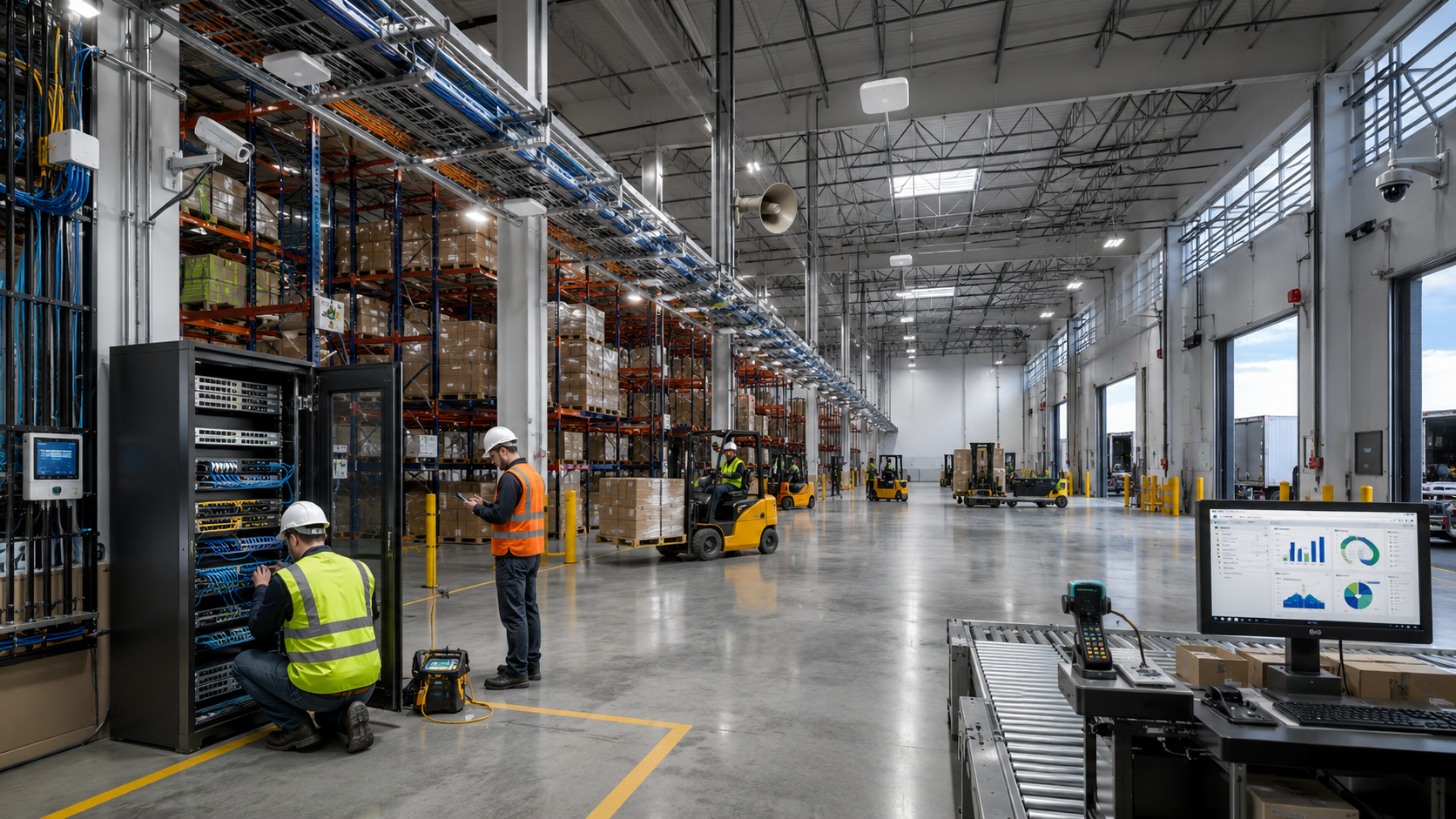
Complete Guide to Warehouse Network Infrastructure
Designing enterprise-grade warehouse networks that deliver reliable connectivity for logistics, manufacturing, distribution, and fulfillment operations — from the fiber backbone and MDF to high-bay WiFi, scanners, cameras, and the loading dock.
The modern warehouse runs on its network.
Warehouse network infrastructure is the structured cabling, fiber backbone, wireless coverage, distribution rooms (MDF/IDF), and power protection that connect every scanner, forklift, camera, printer, and phone in a facility. When it is engineered correctly, inventory moves accurately and shipments go out on time. When it is improvised, the whole operation slows down.
A generation ago, a warehouse needed little more than a phone in the office and power to the dock doors. Today the building itself is a connected system. Inventory is tracked in real time, wireless scanners talk to a warehouse management system (WMS) over WiFi, forklifts carry vehicle-mounted terminals, ceiling cameras watch every dock, and the entire operation depends on cloud software and an internet connection that cannot go down during a shift.
That shift has made network infrastructure mission-critical. Wireless scanning, ERP and WMS platforms, cloud applications, VoIP phones, IP video surveillance, and industrial automation all share the same backbone. A weak access point in aisle 14, an undersized switch in the MDF, or a single fiber run with no redundancy can stall receiving, throw off inventory accuracy, and cost a distribution center thousands of dollars an hour in lost productivity.
This guide is written for the people responsible for that backbone — warehouse and distribution-center managers, operations and IT directors, facilities and construction managers, general and electrical contractors, developers, and the logistics, manufacturing, 3PL, and cold-storage teams who live with the results every day. It explains how enterprise warehouse networks are designed, installed, tested, and supported, and where projects most often go wrong. DataTel 360 has been engineering this infrastructure since 1998; the goal here is to share that experience plainly, not to sell.
What this guide covers
- Why warehouse networks fail — and how to prevent it
- Wireless site surveys for high-bay environments
- Structured cabling and fiber backbone design
- Enterprise WiFi, scanners, and forklift connectivity
- Cameras, paging, MDF/IDF, racks, UPS, and redundancy
- Realistic budgets, timelines, and what to expect
Typical warehouse network examples.
A rough way to size a warehouse network is by square footage, ceiling height, and how the space is used. The four profiles below show the access points, cabling, fiber, cameras, and power protection a facility of each size typically needs — a useful starting point before a formal site survey confirms the real numbers.
Every building is different, but most warehouses fall into one of a few recognizable tiers. Use these as planning benchmarks — to budget, to brief a contractor, or to sanity-check a design you have already been given. They reflect the kind of enterprise structured cabling and wireless work DataTel 360 deploys for distribution centers and manufacturing facilities nationwide.
Small Warehouse
25,000 sq ft- 6 enterprise access points
- 1 MDF
- 1 IDF
- 150 Cat6A drops
- 12 IP cameras
- 600 ft fiber backbone
- UPS-protected core
Medium Distribution Center
50,000 sq ft- 12 access points
- 1 MDF
- 2 IDFs
- 350 Cat6A drops
- 24 cameras
- 2,000 ft fiber
- Paging system
- UPS protection
Large Distribution Center
150,000 sq ft- 28 access points
- 1 MDF
- 4 IDFs
- 900 Cat6A drops
- 70 cameras
- 6,000 ft fiber
- Warehouse paging
- Outdoor WiFi
- Dual core switches
Enterprise Fulfillment Center
500,000+ sq ft- 60+ access points
- 1 MDF
- 8 IDFs
- 2,000+ Cat6A drops
- 150 cameras
- 20,000 ft fiber
- Redundant core
- Generator
- Dual ISPs
- Warehouse automation
Actual requirements vary based on ceiling height, rack density, inventory, applications, wireless devices, and operational requirements. Treat these profiles as a starting point, not a quote — a wireless survey and walkthrough are what turn them into an accurate design.
Table of contents
Jump to any section. Each one opens with a short answer, then the engineering detail behind it.
Why warehouse networks fail.
Most warehouse network problems are not random — they trace back to consumer-grade gear, poor access-point placement in a metal-heavy building, undersized switching, aging cable, and a lack of redundancy, testing, and documentation. Each is preventable with proper design.
A warehouse is one of the hardest RF and cabling environments there is: tall ceilings, steel racking, concrete, forklifts in motion, and constantly changing inventory that absorbs and reflects signal. The failures below are the ones we see most often when we are called in to fix someone else's network.
Consumer WiFi in an industrial space
Off-the-shelf routers and access points cannot handle the device density, roaming, and interference of a working warehouse. They are the single most common root cause of "the scanners keep dropping."
Metal shelving and RF interference
Steel racks reflect and block 2.4 GHz and 5 GHz signal. A layout that works empty fails once it is full of product, because inventory itself attenuates the signal.
Poor access-point placement
APs mounted too high, aimed straight down from a 35-foot ceiling, or spaced for an open office leave dead zones in the aisles where work actually happens.
Aging Cat5 and undocumented cable
Legacy Cat5, unlabeled runs, and "mystery" cables make every move, add, and change slow and risky, and they cap throughput well below what modern equipment expects.
Undersized switches and bottlenecks
A switch without enough ports, PoE budget, or uplink capacity becomes a chokepoint. Cameras, APs, and phones compete for power and bandwidth that was never sized for growth.
No UPS and improper rack cooling
Power events reboot switches mid-shift; a hot, unventilated closet shortens hardware life. Without battery backup, a brief utility blip can take down the whole floor.
Single points of failure
One core switch, one ISP, one fiber path. When any of them fails, the entire operation stops — usually during the busiest week of the year.
Downtime is expensive in a warehouse
When the network is down, receiving stops, scanners go blind, and orders sit unshipped. A few hours of outage during peak season can erase the entire cost of doing the infrastructure right the first time.
10 most common warehouse network mistakes.
The most expensive warehouse network problems are almost always the avoidable ones: consumer-grade WiFi, access points placed for an empty building, skipping the wireless survey, and no battery backup or redundancy. Each mistake below has a straightforward fix when it is caught during design instead of after go-live.
After 27+ years of being called in to repair other people's networks, the same handful of mistakes come up again and again. None of them are exotic — they are shortcuts that look fine on day one and turn into dropped scanners, dead zones, and unplanned downtime once the building fills with product and people.
1. Using consumer WiFi
Off-the-shelf routers and big-box access points cannot handle the device density, fast roaming, and interference of a working warehouse. They are the single most common cause of scanners dropping mid-aisle. Enterprise WiFi is engineered for this environment; consumer gear is not.
2. Poor AP placement
Access points mounted on a 35-foot ceiling and aimed straight down, or spaced as if for an open office, leave dead zones exactly where work happens — in the aisles. Placement should follow the racking and the survey, not the architecture of the roof.
3. No wireless survey
Designing coverage from a floor plan alone ignores how steel racks and stored inventory absorb and reflect signal. A predictive and on-site survey is the difference between coverage that works empty and coverage that works full.
4. No UPS
Without battery backup on the core and distribution switches, a brief utility blip reboots the whole floor mid-shift. A right-sized UPS rides through short events and shuts gear down cleanly during longer ones, protecting both uptime and hardware.
5. Old Cat5 cabling
Legacy Cat5 and unrated runs cap throughput well below what modern PoE devices expect and rarely support today's cameras and access points. Re-cabling to Cat6A structured cabling removes a ceiling you will otherwise hit within a year.
6. Poor rack organization
A tangled, unventilated rack makes every move slow and risky, traps heat that shortens hardware life, and turns a five-minute fix into an hour of tracing cables. Clean rack-and-stack with proper airflow and labeling pays for itself on the first service call.
7. No fiber backbone
Copper-only buildings hit the 100-meter limit fast, forcing daisy-chained switches and bottlenecks. A fiber backbone between distribution rooms carries far more bandwidth over far greater distance and is immune to electrical interference.
8. No documentation
Undocumented networks are slow to troubleshoot and impossible to hand off. Port schedules, rack elevations, fiber maps, and test results turn a building from a mystery into something any technician can support — including your own staff.
9. No redundancy
One core switch, one ISP, one fiber path — any single failure stops the whole operation, usually during peak season. Redundant cores, diverse fiber, and internet failover keep the floor running when something breaks.
10. Improper cable labeling
Unlabeled or inconsistently labeled cabling makes every move, add, and change a guessing game. A clear, standards-based labeling scheme at both ends of every run is one of the cheapest investments with the biggest long-term payoff.
If you only fix one thing before go-live, make it the wireless survey. Almost every other mistake on this list either stems from skipping it or gets caught when it is done properly.
Warehouse wireless site surveys.
A wireless site survey measures how radio signal actually behaves inside your specific building — with your racking, your inventory, and your ceiling height — so access points are placed for real coverage and capacity instead of guesswork. It is the single most valuable step before any WiFi quote.
No two warehouses propagate signal the same way. A predictive survey models coverage from the floor plan and construction before a single AP is hung; a passive survey walks the floor measuring real signal strength, noise, and overlap; an active survey connects to the network and measures actual throughput, roaming, and packet loss as a technician moves through the space. Serious deployments use all three at the right stage.
Good surveys produce heat maps showing coverage and signal-to-noise across every aisle, plus a capacity plan that accounts for how many scanners, tablets, and vehicle terminals will be online at once. RF spectrum analysis finds interference from neighboring tenants, microwave sources, and existing equipment before it becomes a mystery outage.
The hard parts are specific to warehouses: high-bay ceilings that put APs far from the floor, concrete tilt-walls, dense steel racks, cold-storage and freezer rooms, loading docks that open to the outside, and outdoor yards. Survey work validates coverage in all of them and confirms clean signal overlap so a forklift can roam from one end of the building to the other without dropping its connection.
Survey the building the way it will actually run — loaded, with forklifts moving — not as an empty shell. An empty-building survey looks great and fails on day one. It is the highest-leverage step in the whole project, which is why our team insists on it before designing coverage.
Structured cabling design.
Structured cabling is the standards-based copper layer — typically Cat6 or Cat6A — that connects APs, cameras, phones, printers, and workstations back to the distribution rooms. Done right, it is run on proper pathways, tested, certified, labeled, and documented so it lasts 15+ years.
Cabling is the part of the network nobody sees and everyone depends on. In a warehouse it has to survive a rough environment, support Power over Ethernet to ceiling-mounted devices, and leave room to grow.
Cat6 vs. Cat6A. Both carry 10 Gigabit Ethernet, but Cat6A sustains 10G across the full 100-meter channel and adds shielding that matters around motors, drives, and dense racks. For ceiling APs and longer warehouse runs, Cat6A is usually the right future-proof choice; Cat6 is fine for shorter, lower-demand drops.
Pathways. Cable belongs in proper support — cable tray, conduit where exposed, and J-hooks at code-compliant intervals — never draped over sprinkler pipe or ceiling grid. Correct bend radius and separation from electrical are what keep certified performance from degrading over time.
Testing & documentation. Every run should be tested and certified to TIA/EIA standards with calibrated equipment, then labeled at both ends and recorded. The documentation you receive at turnover is what makes the next ten years of moves, adds, and changes fast instead of painful.
- Cat6 horizontal drops
- Cat6A high-bandwidth runs
- Cable tray pathways
- Conduit where exposed
- J-hook support
- Proper bend radius
- TIA/EIA testing
- Certification reports
- Labeling both ends
- As-built documentation
- Capacity for growth
- PoE-ready installs
Fiber backbone design.
The fiber backbone is the high-speed spine that links the MDF to every IDF and across a campus. Single-mode fiber covers long and outdoor runs; multimode (OM4/OM5) handles shorter in-building links. Designed with redundant paths and room to grow, it carries 10G to 100G between distribution points.
Copper runs out at about 100 meters. A warehouse the size of several football fields needs fiber to move traffic from the core to distribution closets, to outbuildings, and between facilities on a campus without bottlenecks.
Fiber type. Single-mode fiber is the choice for long indoor runs, building-to-building links, and outdoor campus pathways. Multimode — OM4 today, OM5 where wideband or higher lane counts are planned — is cost-effective for shorter in-building backbone links. The right mix depends on distances and the speeds you expect to run in five years, not just today.
Speed and switching. Backbone links are commonly engineered at 10G or 25G, scaling to 40G or 100G between core and aggregation switches in large or high-throughput facilities. Core switching ties everything together; aggregation switching fans out to the IDFs. Where uptime is critical, fiber is run as redundant rings so a single cut does not isolate a closet.
Plan for expansion. Pulling extra strands during the initial install is far cheaper than re-trenching a yard or re-pulling a riser later. Good backbone design leaves dark fiber and spare switch capacity for the next phase, the next tenant build-out, or the next automation project.
Cat6A vs. fiber: which goes where.
It is not either/or. Cat6A runs the last 100 meters to devices that need PoE — APs, cameras, phones, workstations. Fiber runs the backbone between distribution rooms and across the campus where distance or bandwidth exceeds copper's limits. Nearly every warehouse uses both.
| Factor | Cat6A (copper) | Fiber (SM / MM) |
|---|---|---|
| Max distance | ~100 m per channel | Hundreds of m to many km |
| Bandwidth | 10G to ~100 m | 10G–100G+ and beyond |
| Power (PoE) | Yes — powers APs, cameras, phones | No — needs local power / media converter |
| Relative cost | Lower per drop | Higher per link, fewer needed |
| Installation | Simpler terminations | Fusion splicing & OTDR testing |
| EMI immunity | Good (shielded) | Immune to electrical interference |
| Future growth | Solid for device edge | Highest headroom for upgrades |
| Best use | Edge devices & drops | Backbone & campus links |
Cable & fiber types compared
The choice is rarely a single media type — it is matching each run to the job. This table compares the copper and fiber options you will actually specify in a warehouse, from short office drops to campus-spanning backbone, so you can see where each one earns its place.
| Media type | Maximum distance | Bandwidth | Typical use | Cost | Future expansion | Best warehouse application |
|---|---|---|---|---|---|---|
| Cat6 | ~55 m at 10G · 100 m at 1G | 1G standard; 10G short runs | Short device drops, offices | $ | Limited | Office & short runs |
| Cat6A | 100 m at 10G | 10G to 100 m | APs, cameras, PoE edge | $$ | Solid for the edge | Standard device cabling |
| OM4 (multimode) | ~400 m at 10G · ~150 m at 100G | 10G–100G | In-building backbone | $$ | Strong | Backbone within a building |
| OM5 (wideband MM) | ~400 m+ with SWDM | 10G–100G+ (SWDM) | High-density backbone | $$$ | Very strong | Growth-headroom backbone |
| Single-mode | Many km | 10G–100G+ and beyond | Campus & between buildings | $$ fiber · $$$ optics | Highest | Campus & longest runs |
When you are already opening walls and pulling cable, lay in a few spare fiber strands beyond what the design needs today. Strand is cheap during construction and expensive to add later — the spare capacity is what lets you jump to higher speeds or add a building without another fiber installation project.
Enterprise warehouse WiFi.
Enterprise warehouse WiFi uses commercial access points — WiFi 6, 6E, or 7 — engineered through a site survey with deliberate channel planning, directional antennas down the aisles, and seamless roaming so scanners and forklifts never drop. It is a designed system, not a box you plug in.
The newest standards matter in a warehouse for a specific reason: device density. WiFi 6 and 6E handle many simultaneous clients far better than older gear, and 6E adds clean 6 GHz spectrum away from crowded channels. WiFi 7 pushes throughput and latency further still. The standard is only half the story, though — placement and tuning are what make it work.
Cloud-managed vs. controller-based. Cloud-managed platforms give a single dashboard across one site or a national portfolio, with remote troubleshooting and firmware control. On-premise controllers still suit some high-density or air-gapped sites. Either way, the design must include deliberate channel planning and RF optimization so adjacent APs do not interfere.
Roaming and coverage. The goal is fast, seamless roaming: a worker walking — or a forklift driving — the length of the building stays connected as the device hands off between APs. Directional antennas focus signal down long aisles instead of wasting it on the ceiling, and proper overlap provides redundancy if one AP fails.
Scanners dropping or dead zones in the aisles? Start with a survey.
A warehouse wireless site survey shows exactly where coverage breaks down — before you spend on access points.
Access point placement & high-ceiling design.
In high-bay warehouses, mounting APs flat on a 30–50 ft ceiling sprays signal into empty air. The fix is lower mounting heights, directional or downtilt antennas aimed into the aisles, and placement that accounts for racks, beams, lighting, catwalks, and sprinklers.
Ceiling heights of 20, 30, 40, and 50+ feet each change the answer. The taller the building, the more a standard omnidirectional AP wastes signal overhead and the more a directional, downtilted antenna pays off. Coverage overlap is planned so a device roams cleanly aisle to aisle, and AP locations are chosen around the building's obstructions — steel beams, high-bay lighting, catwalks, sprinkler lines, and the racking itself, which moves and fills as inventory changes. This is exactly why placement follows a survey rather than a ceiling grid.
Mounting access points flat against a 40-foot ceiling and aiming them straight down is the most common placement error in tall buildings — the signal scatters above the racks instead of reaching the aisle. Downtilted directional antennas at a planned height fix it. If scanners already drop in your aisles, an enterprise WiFi redesign usually starts here.
Mesh vs. enterprise WiFi.
Mesh WiFi avoids cabling by relaying traffic AP-to-AP wirelessly — convenient, but it sacrifices throughput and adds latency with every hop. For a working warehouse with scanners and forklifts, a wired enterprise WiFi system (each AP cabled back to a switch) is more reliable, faster, and far easier to scale.
| Consideration | Mesh WiFi | Wired enterprise WiFi |
|---|---|---|
| Performance | Drops with each wireless hop | Full speed — every AP wired |
| Reliability | Backhaul shares the airwaves | Dedicated cabled backhaul |
| Scalability | Degrades as nodes are added | Scales to hundreds of APs |
| Roaming | Can stutter under load | Designed for fast handoff |
| Security & mgmt | Often limited | Central policy & monitoring |
| Install cost | Lower — less cabling | Higher — cabling per AP |
| Best fit | Temporary / un-cableable spots | Production warehouse floor |
Barcode scanners & forklift connectivity.
Handheld scanners, mobile computers, and vehicle-mounted terminals on forklifts are the most demanding wireless clients in the building. They need low latency, fast re-authentication, and seamless roaming so a worker or a moving forklift stays connected to the WMS from receiving to shipping.
Devices from Zebra Technologies and Honeywell — handheld scanners, rugged tablets, and mobile computers — drive nearly every pick, pack, and put-away. When WiFi roaming or authentication is slow, scans hang and productivity drops in a way that is immediately visible on the floor.
Forklift connectivity raises the bar again. A vehicle-mounted terminal travels constantly across the whole facility, so the wireless design has to deliver continuous coverage and clean handoffs at speed, plus coverage that reaches outdoor staging and yard areas. Industrial antennas and proper AP overlap are what keep a moving forklift online.
Practical details matter too: fast, secure re-authentication so devices reconnect instantly after a brief gap, and well-placed battery and charging stations so equipment is ready for the next shift. Forklift telematics can ride the same network when the design accounts for it.
Warehouse paging & mass notification.
Modern warehouse paging is IP-based: network-connected horn and ceiling speakers, zoned so you can page a dock, an aisle, or the whole building, integrated with the phone system over SIP, and capable of emergency and mass-notification alerts that cut through forklift and conveyor noise.
Paging in a large, loud facility is both an operations tool and a safety system. IP paging puts every speaker on the network, which makes zoning simple — page a single dock door, a pick zone, or every speaker at once — and lets the system tie directly into a Cloud VoIP or SIP phone platform so staff can page from a desk phone or app.
Speaker selection follows the space: high-output horn speakers for open high-bay areas and outdoor docks, ceiling speakers for offices and lower-noise zones, and weather-rated units outdoors. For safety, the same backbone carries emergency notifications and mass alerts, so a shelter, evacuation, or lockdown message reaches the entire workforce instantly. DataTel 360 designs and installs these systems alongside the cabling and network they ride on; see modern warehouse paging solutions.
- IP / network paging
- Zoned paging (dock / aisle / all)
- SIP & phone-system integration
- Horn speakers for high-bay
- Ceiling speakers for offices
- Outdoor & weather-rated paging
- Emergency & safety notifications
- Mass-notification alerts
Security cameras & access control.
Warehouse video and access control ride the same structured cabling and network as everything else. IP cameras cover dock doors, yards, and parking; PoE simplifies power; fiber connects distant outbuildings; and access control plus visitor management protect the perimeter — with storage and bandwidth sized for retention.
Coverage that matters. The highest-value cameras in a warehouse watch loading docks, outdoor yards, parking lots, and entry points — the places where loss, liability, and safety incidents happen. License-plate recognition at the gate and clear dock coverage turn footage into something genuinely useful.
Cabling and connectivity. Most IP cameras are powered over the same Ethernet cable that carries their video (PoE), which keeps installs clean. Cameras on distant outbuildings or across a yard are often fiber-connected back to the core. The network has to budget bandwidth and switch PoE for every camera from day one.
Access & storage. Access control and visitor management secure doors and gates and log who comes and goes. Video storage — on-site NVR, server, or cloud — is sized around how many cameras you run and how long you must retain footage. DataTel 360 provides the low-voltage cabling and network for these systems and coordinates with your security vendor; see security cameras.
Shipping, receiving & office connectivity.
The dock and the front office are two ends of the same network. Packing stations, label printers, industrial PCs, and dock-door equipment need hardwired reliability; the attached offices need business WiFi, Cloud VoIP, printing, and guest access. Both are planned together so the building works as one system.
Shipping & receiving. Packing and shipping workstations, receiving stations, dock-door equipment, industrial PCs, and label printers are the operational heartbeat of fulfillment. These are typically hardwired for reliability and throughput, with cabling planned around the physical layout of the dock and staging areas so nothing depends on marginal wireless at the busiest point in the building.
Office connectivity. Most warehouses have attached offices — executive offices, conference rooms, and admin areas — that run on Cloud VoIP, business WiFi, shared printing, and a separate guest network. Hybrid work means conference rooms need solid video and reliable connectivity, kept logically separate from the operational network.
- Packing & shipping stations
- Receiving stations
- Dock-door equipment
- Industrial PCs
- Label printers
- Warehouse automation feeds
- Executive & admin offices
- Conference rooms
- Cloud VoIP & business WiFi
- Guest & hybrid-work access
Outdoor yard WiFi.
Truck yards, gatehouses, and outdoor docks need coverage too — for yard trucks, drivers, and gate operations. That means outdoor-rated access points, directional antennas, pole or building mounting, and weatherproof enclosures designed to survive sun, rain, and temperature swings.
Indoor APs do not belong outdoors, and indoor coverage rarely reaches the yard. Outdoor wireless is its own design problem: directional antennas aim coverage across truck courts and staging lanes, outdoor-rated APs in weatherproof enclosures handle the elements, and pole or building mounting places them for line-of-sight to where work happens — gatehouses, trailer staging, and outdoor dock positions. Power and cabling to those locations (often fiber plus local power, or outdoor-rated copper within distance limits) are planned alongside the antennas. The result is continuous coverage from the warehouse floor straight out into the yard, so handheld and vehicle devices never fall off the network at the dock door.
MDF & IDF design.
The MDF (Main Distribution Frame) is the building's core network room; IDFs (Intermediate Distribution Frames) are satellite closets that extend the network across a large floor. Both need proper grounding, cable management, cooling, UPS, and documentation — and room to grow.
MDF — the core room
The MDF houses the core switching, the fiber backbone terminations, and the connection to outside services. Good MDF design starts with grounding and bonding for safety and equipment protection, then layers in tidy cable management, a sensible rack layout, dedicated cooling, UPS power, and where required, fire suppression. Critically, it is built with expansion planning and full documentation so the room stays maintainable for years.
- Grounding & bonding
- Core switching & fiber terminations
- Cooling & UPS
- Fire suppression where required
- Expansion planning & documentation
IDF — the satellite closets
In a building too large for copper to reach from one room, IDFs place switching closer to the devices. Each IDF holds access/edge switches, fiber uplinks back to the MDF, patch panels, and clean cable management, with its own cooling and capacity for future expansion. Well-placed IDFs keep copper runs inside the 100-meter limit and make the whole network easier to support.
- Edge / access switch placement
- Fiber uplinks to MDF
- Patch panels & management
- Cooling & airflow
- Capacity for future expansion
Racks, UPS & power.
Network hardware is only as reliable as the rack and power behind it. Proper rack design means organized cable management, adequate cooling and airflow, clean fiber routing, labeled patch panels, and room to grow — all protected by UPS battery backup, power conditioning, and where needed, generator integration.
Rack design
A well-built rack pays dividends for a decade. The fundamentals are disciplined cable management, sufficient power distribution, and cooling and airflow that move heat away from switches. Add tidy fiber routing, clearly labeled patch panels, and consistent labeling throughout, and leave open rack units for growth. The difference between a clean rack and a tangled one shows up every time something needs to be traced or replaced.
UPS & power protection
Warehouses see power events — brownouts, blips, and outages — that reboot unprotected gear mid-shift. UPS battery backup keeps the core, switches, and critical systems running through short interruptions and rides over to a generator on extended outages. Power conditioning smooths dirty utility power, redundant power feeds protect against a single supply failure, and power monitoring warns before a battery is exhausted. Sizing battery runtime to the load is part of the design, not an afterthought.
- Cable management & airflow
- Fiber routing & patch panels
- Labeling & documentation
- Open RU for growth
- UPS battery runtime sized to load
- Generator integration
- Power conditioning
- Redundant feeds & monitoring
Size the UPS to the real load with room to grow, and leave open rack units for the next NVR or switch. A full rack today means opening it back up within a year. Clean, documented MDF/IDF buildouts make every future change faster and safer.
Network redundancy.
Redundancy means no single failure stops the operation. In a warehouse that translates to dual core switches, redundant fiber paths, two internet circuits with automatic failover, and a plan to recover quickly — so a cut cable or a dead ISP becomes a non-event instead of a shutdown.
High availability is about removing single points of failure, layer by layer.
Dual core switches
Two cores in a resilient configuration so the failure of one does not take down the floor.
Redundant fiber paths
Backbone run as rings or diverse paths so a single cut cannot isolate an IDF.
Dual ISPs & failover
Two circuits with automatic failover keep cloud apps, WMS, and VoIP online.
Beyond the hardware, high availability and a clear disaster-recovery plan define how quickly the operation comes back after an event — spare-parts strategy, documented configurations, and tested failover. See disaster recovery & network failover.
Typical costs.
Warehouse network costs vary widely with building size, ceiling height, device count, and how much fiber and redundancy are required. The ranges below are planning-level only — every warehouse needs a professional site survey before any firm number, because the building itself drives the price.
| Scope item | What drives the price | Planning range |
|---|---|---|
| Wireless site survey | Square footage, ceiling height, survey types | $ — project-based |
| Cat6A drop (installed) | Run length, pathways, terminations, testing | $ per drop |
| Fiber backbone link | Distance, strand count, splicing, OTDR testing | $$ per link |
| Enterprise WiFi (per AP) | AP model, mounting height, cabling, antennas | $$ per AP |
| Server / network rack | Switching, PoE budget, cable management | $$ per rack |
| IP paging system | Zones, speaker count, indoor vs. outdoor | $$ by zone |
| MDF buildout | Grounding, cooling, UPS, fire suppression | $$$ project |
| IDF buildout (each) | Switch, uplinks, patch panels, cooling | $$ each |
| Camera cabling (per drop) | PoE drop, distance, indoor vs. outdoor | $ per camera |
| UPS / power protection | Load, runtime, generator integration | $$ by load |
Why we survey before quoting
- Ceiling height changes AP count dramatically
- Racking and inventory affect coverage
- Run lengths decide copper vs. fiber
- Redundancy and UPS scale to your uptime needs
- Outdoor yard coverage is its own line item
- Phasing can spread cost across budgets
Get a survey and a written scope before comparing quotes — otherwise you are comparing different projects. Budget the survey, redundancy, and outdoor coverage as their own line items, and remember that phasing can spread cost across fiscal years. For multi-site or out-of-state buildings, nationwide field services keep the standard consistent at every location.
Typical project timeline.
A warehouse network project runs through discovery, site survey, engineering, procurement, installation, testing and certification, documentation, training, and ongoing support. Smaller upgrades take weeks; large new-construction or multi-site deployments are phased over months.
Discovery
Goals, devices, square footage, growth, and constraints.
Site survey
Wireless & physical survey of the actual building.
Engineering
Design, AP counts, cabling, fiber, racks, and BoM.
Procurement
Materials and equipment ordered and staged.
Installation
Cabling, fiber, APs, racks, and devices installed.
Testing
Coverage validation and throughput verification.
Certification
TIA/EIA copper and OTDR fiber certification.
Documentation
Labeled as-builts, test results, and records.
Training
Handover to your IT and operations teams.
Support
Ongoing support and emergency response.
Real project examples.
Representative warehouse and distribution work — described without naming confidential customers. Each shows the challenge, the solution, and the outcome.

High-bay WiFi & cabling upgrade
Challenge: scanners dropping in the aisles. Solution: survey-driven AP redesign with directional antennas and Cat6A. Outcome: continuous coverage from receiving to shipping.

Redundant fiber campus
Challenge: a single fiber path between buildings. Solution: diverse, fusion-spliced, OTDR-tested fiber rings. Outcome: a cut no longer isolates any building.

MDF/IDF construction
Challenge: a copper-only building too large to cover. Solution: new MDF plus IDF closets with fiber uplinks. Outcome: all runs inside the 100 m limit, fully documented.

Multi-site warehouse rollout
Challenge: consistent networks across many sites. Solution: standardized design deployed nationwide. Outcome: one playbook, one support model, every location.

Dock & yard camera coverage
Challenge: blind spots at docks and gates. Solution: PoE cameras with fiber to outbuildings and LPR at the gate. Outcome: full perimeter visibility and retention.
IP paging & mass notification
Challenge: announcements lost in floor noise. Solution: zoned IP paging tied to the phone system with emergency alerts. Outcome: clear paging and reliable safety messaging.
In-depth project summaries
Three representative engagements, described in detail without identifying confidential customers. Names, locations, and figures are generalized; the engineering is real.
Rescuing a third-party logistics network before peak season
A growing third-party logistics provider had outgrown a network that was never designed for the volume it now carried. Consumer-grade access points had been added piecemeal as the operation expanded, and wireless scanners dropped constantly in the tallest racking aisles. Receiving slowed during inbound surges, inventory accuracy drifted, and a single aging switch in an overheated closet had become a daily risk. With peak season approaching, leadership needed the network stabilized fast — without halting shipping.
We began with a full wireless site survey of the loaded building, not an empty floor plan, to map real coverage against the racking. That data drove a redesigned access-point layout using enterprise hardware and directional antennas tuned to the aisles. We re-cabled the device edge to Cat6A, consolidated the switching onto a properly sized core with adequate PoE, and moved the active gear into a ventilated, UPS-protected rack. The work was phased zone by zone, after hours, so no shift lost the floor.
- Predictive + on-site WiFi survey
- Enterprise access points
- Cat6A structured cabling
- PoE core switching
- UPS-protected rack
Scanners held connection from receiving to shipping, even with the building full. Inbound throughput recovered, inventory accuracy steadied, and the facility went into its busiest weeks without a network-related stoppage. Every run was tested, labeled, and documented at turnover.
Surveying a loaded building — not an empty one — was the decisive step. The original network failed not because the gear was cheap alone, but because no one had measured how stored inventory would absorb the signal. Phasing the cutover protected operations and proved the value of doing the survey first.
A redundant fiber backbone for a temperature-controlled campus
A cold-storage operator ran several connected buildings on a single fiber path between them. One accidental cut could — and once did — isolate an entire freezer building, taking down its monitoring, cameras, and scanners at once. Sub-zero environments are unforgiving on both equipment and signal, and the operator needed connectivity that would not become a single point of failure for temperature-sensitive inventory.
We designed and installed diverse, physically separated fiber routes between buildings so no single cut could isolate a structure. Every link was fusion-spliced and OTDR-tested and certified. Inside each building we extended Cat6A to PoE cameras and IoT sensors rated for cold environments, and tied monitoring into the network so alerts reached staff immediately. Distribution rooms received UPS protection and proper environmental consideration for the conditions.
- Diverse single-mode fiber rings
- Fusion splicing & OTDR testing
- Cold-rated PoE cabling
- IoT sensor connectivity
- IP cameras
A fiber cut on one path no longer isolates any building — traffic simply takes the diverse route. Temperature monitoring, surveillance, and scanning stay online through a fault, and the campus has documented, certified infrastructure it can expand as it grows.
Redundancy has to be physical, not just logical: two strands in the same conduit are still one point of failure. Routing diverse paths through separate pathways was what actually delivered resilience. In cold storage especially, planning for the environment up front avoided premature hardware failures later.
Standardizing networks across a multi-site fulfillment operation
An organization running manufacturing and fulfillment across multiple locations had a different network in every building. Each site had been wired by whoever was local at the time, so support was inconsistent, documentation was thin, and rolling out a new application meant solving the same problems repeatedly. They wanted one standard their own IT team could support everywhere, and infrastructure ready for automation already on the roadmap.
We developed a single reference design — cabling standards, AP density, switching, MDF/IDF layout, labeling, and redundancy — and deployed it site by site with one project-managed playbook. Buildings on the automation roadmap received redundant cores, generous spare fiber, and PoE headroom so future robotics and AI cameras would be a device project, not a re-cabling project. A consistent labeling and documentation package was delivered for every location.
- Standardized reference design
- Redundant core switching
- Spare fiber capacity
- Nationwide field deployment
- As-built documentation
Every site now follows one playbook and one support model. The customer's team can troubleshoot any building from the same documentation, new sites come online faster, and the locations slated for automation have the headroom waiting for it.
Standardization is worth more than any single clever design. The value showed up in support and in every rollout that came after. Designing in headroom — spare fiber and PoE capacity — cost little during construction and saved a full re-cabling cycle as automation arrived.
Why DataTel 360 for warehouse networks.
More than 27 years designing, installing, and supporting commercial network infrastructure — with deep, hands-on warehouse experience.
Warehouse expertise
High-bay wireless, dense racking, docks, and yards — environments we work in constantly.
Fiber specialists
Single-mode and multimode backbones, fusion splicing, and OTDR-certified results.
Structured cabling
Clean, standards-based Cat6/Cat6A drops and backbone cabling, tested and labeled.
Enterprise WiFi
Survey-driven design, channel planning, and roaming built for scanners and forklifts.
Cloud VoIP
Hosted voice, SIP, and paging integration for the offices attached to the warehouse.
Emergency support
Rapid response when a network, fiber, or phone outage threatens a shift.
Smart Hands
Nationwide on-site field services for multi-location and out-of-state facilities.
Testing & certification
Every install tested, certified, photographed, and documented at turnover.
Project management
Experienced coordination from planning through turnover, with one point of contact.
The future of warehouse technology.
AI cameras, robotics, autonomous forklifts, IoT sensors, and private 5G are moving from pilot projects into everyday distribution centers. Every one of them depends on the same foundation: dense wireless coverage, a high-capacity fiber backbone, ample PoE, and low-latency switching. The network is what makes warehouse automation possible — or what holds it back.
It is tempting to treat these as future problems, but the buildings going up today are already being wired for them. The smartest move is to design the underlying infrastructure with enough headroom that adopting the next wave of technology is a software-and-device project, not another cabling project. Here is what is coming, and what each one asks of the network.
AI cameras
On-camera analytics flag safety events, track dock activity, and read labels in real time. They push far more data than legacy CCTV, so they need Cat6A drops, generous PoE budgets, and switching sized for continuous high-bitrate video.
Warehouse robotics
Autonomous mobile robots and goods-to-person systems move inventory without human walking time. They demand seamless wireless roaming across the whole floor, because a robot that loses signal between aisles simply stops.
Autonomous forklifts
Self-driving lifts and tuggers rely on continuous connectivity for navigation, telemetry, and safety overrides. Coverage gaps are not an inconvenience here — they are a safety issue, which raises the bar on survey-driven WiFi design.
IoT sensors
Temperature, humidity, vibration, and occupancy sensors blanket modern facilities — especially in cold storage. Thousands of small devices need reliable wireless and segmented networks so monitoring traffic never competes with operations.
Digital twins
A live digital model of the facility, fed by sensors and cameras, lets operators simulate changes before making them. It only works when the data feeding it is complete and real-time, which puts the network at the center of the model.
Predictive maintenance
Sensors on conveyors, HVAC, and dock equipment predict failures before they happen. The payoff is less downtime — but only if the connectivity carrying that telemetry is itself reliable and monitored.
Edge computing
Processing video and sensor data on-site — rather than shipping it all to the cloud — cuts latency and bandwidth costs. Edge nodes live in the MDF and IDF rooms, so those spaces need the power, cooling, and fiber to support them.
WiFi 7
The latest wireless standard adds capacity, lower latency, and better performance in dense, high-interference spaces — exactly the warehouse problem. Cat6A to every access point is what lets you adopt it without re-cabling later.
Private 5G
Private cellular complements WiFi for wide outdoor yards, moving vehicles, and ultra-reliable links. It rides on the same fiber backbone and distribution rooms, so a well-planned network leaves room to add it.
Warehouse automation
Conveyors, sortation, automated storage and retrieval, and pick-to-light systems are increasingly the core of the operation. They tie directly into the network, so cabling and switching have to be engineered for industrial uptime, not office reliability.
Design for headroom, not just today's devices. Running Cat6A to every drop, sizing PoE and switching above current need, and laying in spare fiber strands now is far cheaper than re-pulling cable when automation arrives. The buildings that adopt new technology smoothly are the ones that were wired for it years earlier.
Ready to plan your warehouse network?
Whether it is a single high-bay WiFi fix or a ground-up distribution-center buildout, start with a site survey and a real conversation with an infrastructure engineer.
Request a Site Survey
Describe your facility in plain English — we handle the technical assessment on-site.
Request SurveyTalk to an Engineer
Call to discuss scope, phasing, or budget pricing for a warehouse or multi-site rollout.
770-441-9999Emergency Support
Network down? Fiber cut? Scanners offline? We respond fast for warehouse outages.
Get Emergency HelpWarehouse network infrastructure questions.
Don't see your question? Request a quote, call 770-441-9999, or email support@datatel360.com.
What is warehouse network infrastructure?
Why does my warehouse WiFi keep dropping?
Do I need a wireless site survey before installing WiFi?
How many access points does a warehouse need?
Should I use Cat6 or Cat6A in a warehouse?
When should I use fiber instead of copper?
What is the difference between an MDF and an IDF?
How do you get WiFi to cover a 40-foot ceiling?
Will WiFi work for barcode scanners and forklift terminals?
Do you support Zebra and Honeywell devices?
Can you provide WiFi for the outdoor truck yard?
What does a warehouse network project cost?
How long does a warehouse network installation take?
Do you install IP paging systems?
Can you handle security camera cabling too?
What is PoE and why does it matter in a warehouse?
Do you provide UPS and power protection?
How do you build redundancy into a warehouse network?
Do you certify and document the installation?
Can you future-proof the network for automation and growth?
Do you work in cold storage and freezer environments?
Can you upgrade our network without shutting down operations?
Do you handle multi-location and nationwide warehouse rollouts?
What is the difference between mesh and enterprise WiFi?
Do you provide emergency and after-hours warehouse support?
Can you support new warehouse construction from the ground up?
What areas do you serve for warehouse projects?
How long has DataTel 360 been in business?
Warehouse network infrastructure across Atlanta & nationwide.
DataTel 360 designs and installs warehouse and distribution-center networks throughout metro Atlanta and North Georgia, and delivers multi-location and nationwide warehouse deployments through our field-services network. From a single high-bay WiFi survey to a full ground-up buildout, our crews show up, do clean work, and document it.
Explore related services: structured cabling, fiber optic installation, business WiFi & failover, Cloud VoIP, network infrastructure, MDF & IDF buildouts, security cameras, warehouse paging, and emergency support.
Metro Atlanta & North Georgia
Let's design a warehouse network that keeps you running.
Structured cabling, fiber, high-bay WiFi, paging, cameras, MDF/IDF, and redundancy — engineered, installed, tested, and supported. Atlanta-based, nationwide capable, since 1998.