
 Managed UniFi services · Atlanta
Managed UniFi Network Services for Business
DataTel 360 takes responsibility for your Ubiquiti UniFi network after it is installed: we watch it, troubleshoot it, plan its updates, keep it documented, and send a technician when the problem is in a closet or a cable run. Whether you are planning a new UniFi deployment or need a team to take over the one you already have, we start with an assessment of your sites.
- New UniFi deployments
- Existing UniFi networks
- Co-managed support for internal IT

- Serving businesses since 1998
- Atlanta based
- 4.9 Google rating
- 35-year warranty on eligible structured cabling
One team responsible for the network after go-live
Most UniFi problems are not hard to fix. They are hard to own. Nobody is reviewing alerts, firmware is months behind, the admin login belongs to someone who left, and the same Wi-Fi complaint comes back every few weeks. Managed UniFi services from DataTel 360 put one accountable team on that list.
- Monitoring and alert review. We watch device status, offline alerts and client health in UniFi Site Manager and follow up on what matters, instead of letting notifications pile up.
- Remote troubleshooting. When users report slow Wi-Fi, dropped calls or a dead port, we check the access point, switch port, PoE draw and uplinks remotely before anyone drives out.
- Firmware and configuration change planning. Updates and changes are reviewed, scheduled for an agreed window and recorded, so a firmware release never surprises you in the middle of a shift.
- Documentation. Device inventory, network and VLAN plan, switch port maps, closet locations and admin access are written down and kept current.
- On-site service coordination. If the fix is physical, we schedule the field visit and send a technician who already has the network history.

When remote troubleshooting turns into a site visit
Remote work solves configuration problems. It cannot replace a failed access point or re-terminate a damaged cable. Here is who does what when a problem needs hands on site.
| Step | DataTel 360 | Your team |
|---|---|---|
| 1. Report | Receives the alert or ticket and confirms the impact: one user, one area, or a whole site. | Reports the issue by phone or email, or approves our alert follow-up. |
| 2. Diagnose | Checks the UniFi console remotely: device status, switch port, PoE, uplink and recent changes. | Answers quick questions about what users are seeing. |
| 3. Dispatch | If the cause is a switch, access point, cable run, fiber uplink or closet, schedules a technician and states what they will check. | Confirms building access and a site contact. |
| 4. Repair | Replaces or repairs the component. New copper is certified to the specified category; fiber is loss-tested, with OTDR testing where required. | Approves any hardware or out-of-scope work before it is done. |
| 5. Close out | Updates the documentation and sends a short summary of the cause and the fix. | Confirms the issue is resolved. |
Because DataTel 360 is also a structured cabling contractor, the same company that manages the network can repair the commercial network cabling, fiber uplinks and MDF and IDF rooms it runs on.
How a UniFi network is built for commercial sites
A UniFi network has three layers, all managed in the UniFi Network application and reachable remotely through UniFi Site Manager. Ubiquiti's UniFi Enterprise line adds rack-mount gateways and switching built for larger, busier sites. Picking the right model at each layer is what separates a network that holds up in a warehouse from one that generates tickets.
Ubiquiti does not charge per-device licensing for UniFi Site Manager remote management. Some features, such as expanded threat signatures on the Enterprise Firewall, depend on a separate CyberSecure subscription.

Gateways: the security and routing edge
The gateway connects the site to the internet, runs the firewall, routes between networks, and handles VPN and multi-WAN failover.
Depends on: model and site size. A single office often needs a smaller Cloud Gateway; the Enterprise Firewall suits large or multi-WAN sites. High availability requires two matching gateways.
Managed switches: the wired backbone
Switches connect and power access points, cameras and phones, carry VLANs, and link closets together over copper or fiber.
Depends on: PoE budget and uplink speed. Wi-Fi 7 access points need PoE+ and benefit from 2.5 GbE ports; the Pro Max line requires UniFi Network 8.0.24 or later.
Access points: coverage where people work
Access points deliver Wi-Fi to staff, scanners, tablets and guests, and roam devices from one AP to the next as they move.
Depends on: the building. Published coverage figures are open-space estimates. Racking, metal and ceiling height in warehouses change the real number, so AP count comes from a survey, not a spec sheet. Requires UniFi Network 8.0.28 or later.
What that looks like in practice
Separate guest and business traffic
Guest Wi-Fi goes on its own virtual network (VLAN) with guest isolation, so visitors reach the internet but not your file servers, printers or cameras. Full isolation between networks requires a UniFi gateway or Layer 3 switch routing those VLANs.
Fix warehouse Wi-Fi dead zones
Scanner drop-offs at the back racks are usually an AP placement and cabling problem. We survey, add or move access points on new drops from the closet, and confirm roaming between aisles.
See every location from one screen
UniFi Site Manager shows every site your account administers in one dashboard, so your IT lead and DataTel 360 can see which location has an offline switch before users call.
Product specifications are from Ubiquiti's published tech specs and can change with new hardware and software releases. We confirm the current datasheet for each model during design.
Start where your network is today
Take over an existing UniFi network
For networks installed by someone else, or managed by staff who have moved on.
- Assessment of equipment, access and configuration
- Transition plan and admin access handover
- Ongoing management once the network is documented
Design and deploy a new or upgraded UniFi network
For new buildings, expansions, and sites replacing aging switches or access points.
- Site survey, AP layout and hardware selection
- Cabling, fiber uplinks and closet buildout
- Configuration, testing and as-built documentation
Add ongoing or co-managed support
For teams that want an outside partner after installation, for every site or just some.
- Fully managed or co-managed with your IT team
- Specific sites, projects or escalations
- Field service coordinated with remote support
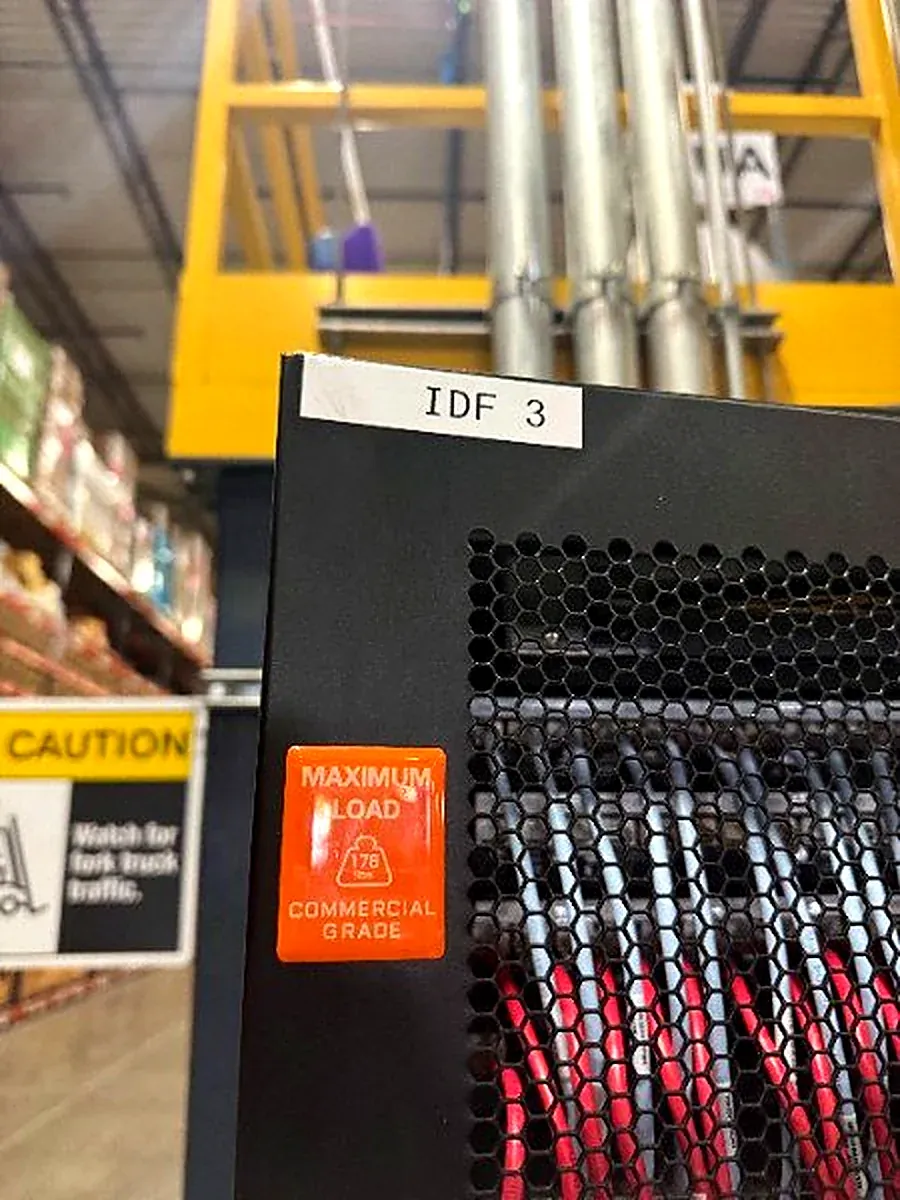
UniFi installation in Atlanta, built on the cabling underneath it
A new UniFi network is only as reliable as the cabling, fiber and closets it sits on. DataTel 360 plans the access point layout with the cable runs, uplinks and IDF locations in mind, then installs and tests that infrastructure with the same crews.
For larger buildings we usually start with a technology site survey to confirm drop counts, AP locations and pathways. Businesses with several locations can roll out the same design site by site through our multi-location rollout services.
The assessment, in plain English
Before we agree to support a network, we need to know what is in it, who controls it and where it hurts. The assessment answers those questions and gives you a written record whether or not you choose DataTel 360.
- Equipment inventory. Every gateway, switch and access point: model, firmware version, location, and whether it is still supported.
- Administrative ownership and access. Who owns the UI account and console, who has admin rights, and whether those logins belong to current staff.
- Network topology. How the closets, switches and uplinks connect, including any single points of failure.
- Existing configuration. Networks and VLANs, Wi-Fi settings, firewall rules, VPNs and backups, and whether sites are set up consistently.
- Known trouble spots. The rooms, aisles and times of day users complain about, matched against what the console shows.
What happens with the findings
You receive a summary of what we found, ranked by risk. That becomes the basis of two documents:
- A support proposal that states what DataTel 360 will be responsible for, what stays with your team, and how on-site work is handled.
- A transition plan covering admin access handover, firmware and configuration clean-up, documentation, and any hardware that should be replaced, scheduled around your operating hours.
What we can take over depends on the assessment. Equipment reuse, takeover scope and timeline are confirmed only after we have reviewed the network. Unsupported hardware or missing admin access may need to be resolved before ongoing support begins.
Ubiquiti UniFi support questions
Can we keep our existing UniFi equipment?
Often, yes. During the assessment we inventory every gateway, switch and access point, check its model, firmware and condition, and confirm it is still supported by current UniFi Network releases. Hardware that is healthy and supported can usually stay in place. Anything that is end-of-life, undersized for the load, or repeatedly failing is listed in the findings with a recommended replacement. We decide what stays only after the assessment, not before.
Can DataTel 360 work alongside our internal IT team?
Yes. Co-managed support is a common arrangement. Your team can keep ownership of the UniFi account and day-to-day decisions while DataTel 360 handles specific sites, projects or escalations. We agree on who holds which admin roles, who approves changes, and who is called first, and we write those responsibilities into the support agreement.
What can be handled remotely?
Most configuration and diagnostic work can be done remotely through UniFi Site Manager: reviewing device and client status, checking switch port and PoE status, adjusting Wi-Fi and network settings, reviewing logs, and planning firmware updates. Remote access depends on the console having remote management enabled and on the admin access you grant us.
When is a site visit needed?
A technician goes on site when the problem is physical: a failed switch or access point, a damaged or miswired cable run, a fiber uplink that is down or showing high loss, power or cooling problems in a network closet, or new cabling and mounting work. If remote troubleshooting points to one of these, we schedule a field visit and tell you what the technician will check before they arrive.
How is recurring support scoped and priced?
Recurring support is quoted after the assessment. Pricing depends on the number of locations, the number and type of UniFi devices, how much of the network we are responsible for, whether support is fully managed or co-managed, the hours you need covered, and how often on-site work is expected. On-site visits, new cabling and hardware are quoted separately unless your agreement says otherwise.
Do you install new UniFi networks too?
Yes. DataTel 360 designs and installs UniFi networks for offices, warehouses and multi-site operations, including the structured cabling, fiber uplinks and network closet work underneath them. Ongoing management can start the day the network is turned up.
We have an outage right now. What should we do?
Call 770-441-9999 and tell us the network is down. You can also tick the active outage box on the form below, but a phone call is the fastest way to reach us during an outage.
Request a Network Assessment
Tell us a little about your sites. A DataTel 360 engineer will review the request and follow up to schedule the assessment and confirm what it will cover.
DataTel 360 serves commercial clients throughout Metro Atlanta, Georgia and the Southeast, with selected nationwide project locations.
Thanks. Your assessment request is ready.
Your email app should open with your details filled in. Press send and a DataTel 360 engineer will review your request and reply to the email address you provided. If your email app did not open, email sales@datatel360.com or call 770-441-9999.